How DSH plugins are verified
Star counts measure attention. Verification measures how far a listing was actually checked. Every plugin here carries a level from L1 to L5 plus a security status and a health field, and the rules below are what those labels mean.
What the rules rest on
The verification rules below are this directory's own, but two of their premises come from other people. Both are quoted here in full so they can be checked against the source rather than taken on trust.
“The OWASP Top 10 is a standard awareness document for developers and web application security. It represents a broad consensus about the most critical security risks to web applications.”
“DeepSeek Harness is in developer preview and iterating rapidly. THERE WILL BE COMPATIBILITY-BREAKING CHANGES.”
The five levels
| Level | Rule | Listed |
|---|---|---|
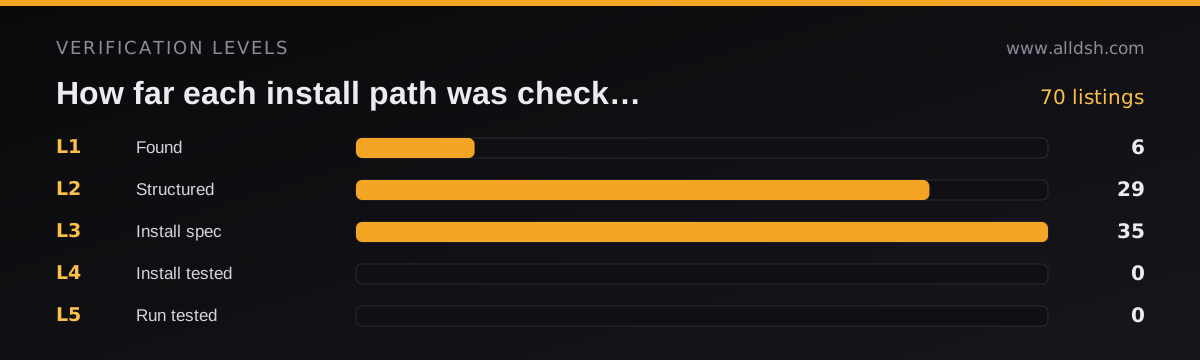
| L1 | FoundRepository accessible, non-empty, README exists | 6 |
| L2 | StructuredManifest valid, key fields complete | 29 |
| L3 | Install specInstall command parsed, DSH target declared | 35 |
| L4 | Install testedInstalled in an isolated sandbox without dependency errors | 0 |
| L5 | Run testedPlugin loads and runs; smoke test passed | 0 |
What is claimed today, and what is not
The counts in the table above are the honest state of this directory, not a target. No listing currently claims L4 or L5, because those levels require an install inside an isolated sandbox and a smoke test run, and this directory keeps no such records. L2 is not a failure state: it means the install command resolved but the author declares no harness target, so there is no declared compatibility to record.
What L3 does mean is verifiable by anyone: the repository resolves, a README exists, the manifest parses, the install command resolves against the published package, and the author declares a harness target, which this directory records verbatim as dshTarget. Those five checks are re-run against live sources on every build, and the command that does it is in the repository.
Levels also do not expire by themselves. A listing keeps its level until the next check changes it, which is why every listing carries the date it was last reviewed.
README badges
Every curated listing has a first-party badge: an SVG served from this domain at /badges/<slug>.svg, regenerated from catalog data on every build. The level printed on a badge is the level in the catalog — the author cannot edit it, and a badge URL for a plugin this directory does not list simply does not exist. That is what makes the image a claim rather than a decoration, and it is why the badge says verified · L3 rather than anything stronger.
Each plugin page carries a Share this listing panel with copy-ready markdown for the level badge, a star-count badge and a 440×200 card. Badge responses use a short cache lifetime (five minutes client-side, one hour at the edge) so a level change reaches existing READMEs within hours of the build that made it.
What a security scan covers
Where a scan has run, it is automated static analysis over the repository: declared dependencies, the permissions the code requests, obvious secret handling mistakes, and supply chain signals such as a suspiciously new package name or an install script that downloads and executes code.
An automated scan is a first line of defence, not a manual review. It will not catch a logically malicious plugin written to look ordinary, which is why the permission question stays on every listing and why thesecurity guide walks through the review you should still do yourself.
The four questions on every listing
- What is it?
- Category, use cases and tags taken from the repository description, never invented.
- Is it safe?
- Security scan status plus the permission surface a reader needs to check before installing.
- Can I install it?
- Verification level L1 to L5, and an install command checked against the published package name.
- Is it maintained?
- Health field derived from commit activity, plus the declared dshTarget release and last update date.
Corrections
Listings go wrong in predictable ways: an install command drifts from a renamed package, a repository is archived, or a category no longer fits. Corrections are welcome from anyone, including maintainers who want their own listing fixed. Send them through thecontact page, and read theeditorial policy for how inclusion and removal decisions are made.
Questions
Does a verification level mean a plugin is safe?
No. Verification records how far the install path was exercised, from finding the repository to running the plugin. Safety depends on what the plugin can reach and what its code does, which is why every listing shows the permissions question separately.
Who performs the verification?
This directory performs its own checks against public repository data and records the result on each listing. Plugins are not submitted for approval by DeepSeek, and an official DeepSeek registry does not exist.
How often is a listing rechecked?
Listings are refreshed regularly, and any change to the repository, the install spec or the declared compatibility target is reflected in the listing. The last update date is shown on each plugin page.
Can a listing be removed?
Yes. A listing is corrected or removed when the install spec no longer matches the published package, the repository disappears, or the plugin is reported as malicious. Corrections can be requested on the contact page.