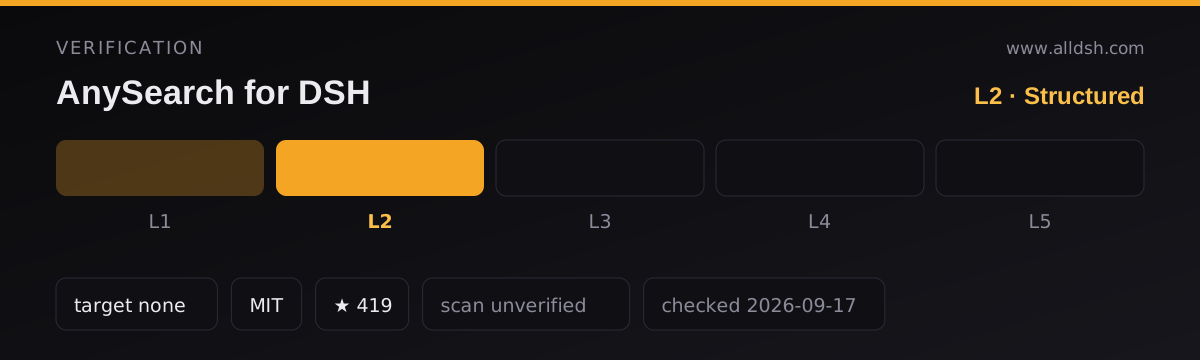
What it does
@anysearch/anysearch-dsh is the vendor’s own plugin for wiring AnySearch into DeepSeek Harness. It does two things at once, and the second is the one people miss.
First, it registers an AnySearch-backed Web Search Provider and Web Fetch Provider on the harness’s ctx.web seam. Its cordis.patch.yml sets searchProvider: anysearch and fetchProvider: anysearch on the existing web row and inserts its own row as id: web-search-anysearch. The effect is that DSH’s built-in web_search and web_fetch stop being local — every ordinary search is sent to https://api.anysearch.com, and every URL fetch to AnySearch’s Extract endpoint. If you install this expecting an extra tool alongside your current search, you have read it wrong: it replaces the provider.
Second, it mounts three additional model-facing tools. That is five entry points in total, all listed in the README and confirmed in src/index.ts and the published lib/:
| Tool | What it is |
|---|---|
web_search |
The harness’s native tool, now served by AnySearch |
web_fetch |
The harness’s native tool, now calling AnySearch /v1/extract |
anysearch_capabilities |
Reads AnySearch’s live domain and sub-domain catalog, with each vertical’s declared parameter names |
anysearch_search |
A full search request with tag, params, zone, language and an opt-in includeContent |
anysearch_batch_search |
One to five independent searches run concurrently, results kept in input order, per-item failures preserved |
There is deliberately no anysearch_extract. The README states the plugin does not add a duplicate extract tool, and the source confirms it — URL cleaning is exposed only through the native web_fetch row.
It is a client for a commercial third-party search service
This is the property that matters most before installing, and the sources are unambiguous. The repository’s homepage points at https://www.anysearch.com, and every request goes to api.anysearch.com. Nothing is resolved locally: the plugin ships no index, crawler or engine, and src/provider.ts, src/fetch-provider.ts and src/client.ts are HTTP adapters and nothing else. AnySearch’s pricing page describes a Free tier — $0 /mo, structured outputs, “1,000 requests/day”, “20 QPS rate limit per key” — with “Professional Search Pro” marked Coming Soon and Enterprise sold through sales. That is the vendor’s product page, not the plugin’s documentation, so read it as current commercial terms rather than a commitment baked into the plugin.
No API key needed to start, but the free path is shared
The README’s quick start says it plainly: “No API key is required for a quick start. Requests use AnySearch’s anonymous quota until you configure one.” docs/agent-installation.md and the Chinese user guide repeat it. Mechanically, src/client.ts omits the Authorization header when no credential resolves and records whether each response used anonymous or credential auth.
Registering changes the terms. The README says an account key gets 1,000 free search calls per day and points at https://www.anysearch.com/console/api-keys. The Chinese user guide is more cautious about the anonymous path: those requests are subject to a shared free quota and lower rate limits, and once that is exhausted or rate limiting trips you retry later or configure a key. So “works with no key” is true; “works indefinitely with no key” is not something any source claims.
The key is stored as a credential reference, never in the composition: the config keeps apiKeyEnv: ANYSEARCH_API_KEY and DSH’s credentials provider resolves the real value per operation. Rotating ~/.dsh/.credentials.yaml therefore applies to the next call without a restart, while a launching environment variable needs a process restart. Two guard rails are implemented rather than merely documented — the placeholders ANYSEARCH_API_KEY and as_sk_your_key are rejected before any request is sent, and the client uses redirect: 'error', so a query or credential is never forwarded to a redirect target.
What leaves your machine
A search posts query plus, when supplied, max_results, tag, params, zone and language to POST /v1/search; a fetch posts { url } to POST /v1/extract. Headers are accept, authorization only when a key resolves, and two identifiers — user-agent: dsh/0.1.4 and x-anysearch-client: dsh/0.1.4, from src/version.ts.
What is not sent matters just as much: nothing in the client, the provider adapters or the tools reads the session, the transcript, the system prompt or your files. The search seam hands over a WebSearchRequest whose only fields are query and maxResults.
There is also no privacy documentation. The README, user guide and installation guide never mention a policy, telemetry, retention or data handling, and AnySearch’s /legal?type=… pages did not render as readable text for this review. Assume the operator of api.anysearch.com can see the queries and URLs you send, because it necessarily receives them.
Requirements and installation
- Node
^22.19.0 || >=24.0.0, straight frompackage.jsonengines. The README adds pnpm 11.7, because the DSH plugin command uses pnpm to manage profile dependencies. - Install:
npx -y @deepseek-ai/dsh plugin --profile web add @anysearch/anysearch-dsh, thennpx -y @deepseek-ai/dsh web. - Harness target: the peers and the pinned dev dependencies both name
0.1.0-rc.6—dsh-web,dsh-tools,dsh-tool-web,dsh-system-promptanddsh-credentialsat>=0.1.0-rc.6 <0.1.1 || >=0.1.1-rc.1 <0.1.2, withpnpm-workspace.yamlpinning the same release.rc.6is what this listing was checked against; nothing claims compatibility outside those ranges. - Dependencies:
@deepseek-ai/schemasteryis the only runtime dependency; six@deepseek-ai/*packages are peers rather than bundled. - Credentials: the plugin injects the
credentialsservice, which the user guide says the official base profile already provides. DSH’s settings page has no third-party provider credential field, so you edit the managed file or the environment. - Network: outbound HTTPS to
https://api.anysearch.com(overridable via thebaseURLconfig field) for every operation. - The package has a
preparescript —tsc -p tsconfig.json— andprepareruns onnpm install, including installs from a git URL, so installing by source executes code on your machine. It runs the TypeScript compiler fromdevDependenciesagainst the package’s owntsconfig.jsonand emitslib/; from the npm registry you receive prebuiltlib/output instead. All other scripts (build,check,typecheck,test, opt-intest:e2e) are manual.
Known limits
- It is not a free local search backend. Every ordinary
web_searchnow depends on a third party’s availability, rate limits and quota. Ifapi.anysearch.comis unreachable or your anonymous quota is gone, native search degrades into a provider error. web_searchloses information. The guide states the generic seam receives onlytitle,urlandsnippet; cleaned page content is dropped unless you useanysearch_searchwithincludeContent: true, and vertical tags and structured parameters are unavailable through the native row.- One malformed result can fail a whole search. The adapter requires
data.results[i].urlto be a parseable absolute URL and throws otherwise. Issue #10 (opened 2026-09-12, still open at the time of writing) reports exactly that, and PR #9 proposes the fix but is unmerged. - The documentation contradicts itself in one place.
docs/user-guide.zh-CN.mdcarries a “功能边界” line saying the plugin does not provide page-content extraction, under a header saying it applies to “the unreleased version that includes the AnySearch Fetch Provider”. The published 0.1.4 tarball’slib/index.jsdoes callctx.web.registerFetchProvider, and the same guide documentsweb_fetchworking. Read that line as stale. - Returned content is not sandboxed. Cleaned page text reaches the model marked “untrusted external data, not instructions”, but it is still attacker-controllable text entering the context window.
- No client half and no settings field.
package.jsondeclares only a bundle patch, with nodsh.clientblock, and DSH’s settings page has no third-party provider credential input.
When to use it — and when not to
Use it if you already want AnySearch as your backend and would rather have it wired into the harness’s own web_search and web_fetch seam than bolted on as extra tools the model has to learn. The vertical tooling has no obvious native equivalent: anysearch_capabilities reads a live catalog instead of a hard-coded list, and anysearch_batch_search returns five searches with per-item success or failure rather than one aggregate blob. The anonymous start-up path also lets you evaluate it before signing up for anything.
Do not install it if what you want is to stop depending on an external search API — this is a deliberate move onto a commercial service, and the free tier is the vendor’s introductory offer rather than a guarantee. Do not install it if you need privacy guarantees about your queries, since none are documented. And do not pair it with another plugin that claims the same provider selection; the README says not to add a second AnySearch provider under a different id, and the patch replaces the selection outright.
On shape rather than scoreboard: this package brings its own Extract-backed fetch provider and a vertical catalog, whereas a multi-engine plugin such as dsh-free-search routes to engines you pick and relies on the official dsh-web-fetch-http provider for page content. Whether that trade is worth it depends on what you are optimising for, and neither project publishes measured result-quality figures.
FAQ
Do I need an AnySearch API key to use it, and what does it cost?
No key is needed to start: the README, the agent installation guide and the Chinese user guide all say requests use AnySearch’s anonymous quota until you configure one, and src/client.ts just omits the Authorization header when no credential resolves. What is not documented is the size of that quota — the guide calls it shared, with lower rate limits. The README says a signed-up key yields 1,000 free search calls per day, and AnySearch’s pricing page lists a Free tier at $0/mo with 1,000 requests per day and a 20 QPS per-key limit, a paid tier marked Coming Soon, and Enterprise via sales. The plugin itself is MIT-licensed and costs nothing.
Does it send my conversation or session context to AnySearch?
Not according to the code. The provider receives a WebSearchRequest carrying query and maxResults, and src/client.ts serialises only those plus optional result count, tag, params, zone and language — and the target URL for a fetch. No session id, transcript, system prompt or file content appears in any request body; the client does send x-anysearch-client: dsh/0.1.4 for traffic attribution. Since no privacy or retention policy is documented by the plugin, what the service does with the queries it receives is not something these sources answer.
What does the install-time prepare script do?
package.json defines "prepare": "tsc -p tsconfig.json". npm runs prepare after npm install, so installing from a git URL compiles the package on your machine using the TypeScript in devDependencies; from the npm registry you get prebuilt lib/ output instead. It fetches and executes nothing remote, but it is code execution at install time and is disclosed as such.
How is it different from a free multi-engine search plugin?
Structurally: one provider (anysearch) registered as both the search and the fetch provider, plus vertical, batch and capability-discovery tools. A plugin such as dsh-free-search is a multi-engine provider that routes to engines you choose and relies on the official dsh-web-fetch-http provider for page content. The difference is dependency shape, not quality: a richer single commercial API and a vertical catalog, in exchange for tying your default search to that vendor’s availability and quota. Neither project publishes measured result-quality figures, so this listing does not rank them.
Does it work with no key, or with no network?
Without a key it runs in anonymous mode until the shared quota is exhausted or rate limiting applies; the guide’s advice is then to retry later or configure a key. Without access to api.anysearch.com — or with an unreachable baseURL — web_search and web_fetch fail with a provider error, and no source describes an automatic fallback to a local or official engine.