What it does
treg is two things behind one token: a hosted proxy that injects provider credentials server-side, and a registry where a team shares its own endpoints, vendor CLIs and skills. The repository calls itself “OpenRouter for agent tools”; the hosted service is treg.to, and the code is designed to be self-hosted.
The misreading that matters most is the name “registry”, which is the smaller half. The load-bearing half is a relay: the agent builds an ordinary upstream request, prefixes it with https://treg.to/call/, and treg resolves the tool by host, decrypts the matching credential and forwards the bytes.
Where your credentials actually live
Read this before installing. The flow below comes from the sources, not the marketing copy.
- The agent token lives on your machine.
treg loginwrites one identity token into~/.treg/config.json, created0600inside a0700directory (also read fromTREG_TOKEN). It names a(user, org)membership, not a provider key. - Provider credentials live on the server.
SECURITY.md: stored secrets are Fernet-encrypted with the key held only in the server environment, and “the proxy never hands the key to the caller” — for an HTTP tool, “the registry injects the credential server-side and makes the upstream call; the consumer’s token only authorizes it.” - Calls go through treg, not direct to the provider. The architecture notes reject the alternative: a rival gateway “decrypts secrets on the laptop”, which treg calls “the exact situation treg exists to prevent”.
- treg strips its own headers upstream.
x-treg-tokenandx-treg-orgare in the drop list, so your token does not leak to the provider.treg runalso executes a vendor CLI locally as a locked-downtreg-runuser under an egress allow-list.
So the default path stores no provider key on your machine and sends none from it. On OAuth-backed treg run, the server releases only the short-lived leaf access token to the local sandbox; refresh_token and client_secret stay server-side.
What treg can see
A relay sees what it relays. The sources are unusually direct about this, and it cuts both ways.
- Successful calls retain no content. “The relay forwards bytes and the audit row records status, size and timing.”
- Failed calls keep redacted evidence.
CallRecord.error_request/error_responseretain “a redacted, truncated copy” of what the caller sent and what the provider answered — masked before truncation, purged after 14 days on the admin view. - Responses are archived. Every version of every answer is kept with its timestamp, described as deliberate — “the future data product”. A team can read back the answer its own call received.
- Request bodies are capped. On unmetered paths a caller body is retained only when
Content-Lengthis declared and at most 64 KiB; larger or chunked uploads keep only their query-parameter half.
treg does not need your payloads to work, but it can see them.
What is free, and what needs an account
- The catalog is the free path. Anonymous calls — a verified public route needing no provider key — are free and require no provider account. Paid catalog endpoints use either the team’s prepaid balance (treg’s own key) or the team’s stored key; the caller’s own key always wins and is not metered. An endpoint treg has no published price for is refused rather than served free.
- Your own tools need an account and a team:
treg secret add,treg add <tool> --base-url,treg upload(scans a.envagainst ~80 known providers, plus skill directories and catalog CLIs), andtreg skill install. Teams are the scoping unit, with per-member tool allow-lists. Self-hosting is supported and encouraged; the PyPI base package is the CLI only, while running a registry needspip install "tools-registry[server]".
What the DSH bundle actually ships
package.json declares "dsh": { "bundle": { "patch": "./dsh/cordis.patch.yml" } }, and that patch contributes exactly two rows:
treg-skill— always on, no token needed. It mountstreg-dsh, whosedsh/index.jsregisters onectx.skillsprovider publishingdsh/skills/treg/SKILL.md.treg-mcp—@deepseek-ai/dsh-mcp-clientpointed athttps://treg.to/mcp/over streamable HTTP with aBearerheader read from the environment. It is disabled by default:disabled: !!js (process.env.TREG_TOKEN ?? '') === ''.
So the accurate description is: install it and dsh registers no networked treg tools at all — you get one skill. Export TREG_TOKEN, restart dsh, and the MCP row enables, after which mcp__treg__catalog_search, catalog_get, call, balance and my_tools appear. The expression is evaluated at boot, so a token exported into a running harness changes nothing until restart; the packaged skill says so explicitly. docs/DSH-PLUGIN.md adds that the bundle is plain JavaScript with no build step and no @deepseek-ai/* dependency, because dsh plugin add github:... fetches sources rather than build output and a prepare script would break the documented install under pnpm ≥10.
Requirements
- Install spec: the documented command is
dsh plugin --profile <name> add github:superdesigndev/treg; the profile name is a placeholder in that file. There is no npm package for this bundle —package.jsonnames ittreg-dsh, and that name is not on npm. - No install-time code.
package.jsonhas noscriptsblock — nopreinstall/install/postinstall/prepare— and declares no dependencies or peer dependencies. - CLI: Python
>=3.12,<3.14, from the PyPI distributiontools-registry(0.19.1); the server extra adds FastAPI, the database drivers andcryptography. The bundle manifest has noenginesfield. A separate npm launcher,@superdesign/treg(unrelated to this bundle), declaresnode >=18. - Harness version: not declared. Nothing in
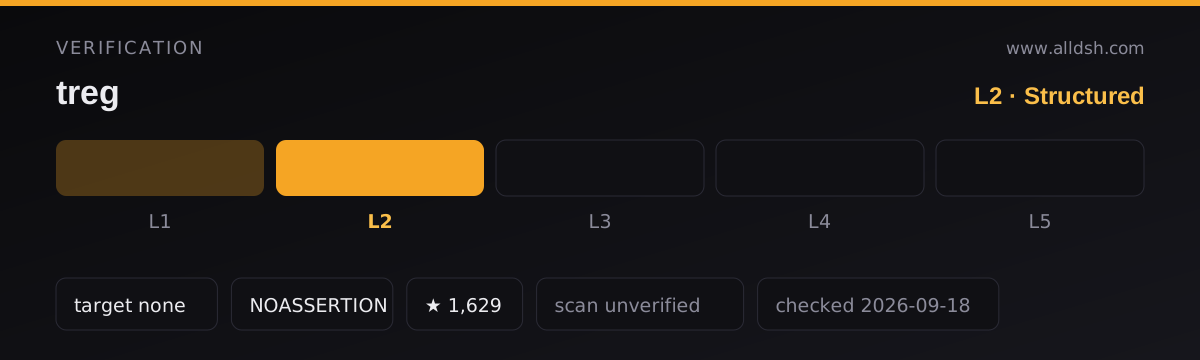
package.json, the README,docs/DSH-PLUGIN.mdor the packagedSKILL.mdnames a supported or tested DSH version, so this listing carries nodshTargetandverificationis L2, not L3. - Telemetry is documented and can be turned off. Against treg.to the CLI sends PostHog anonymous command usage — command name, exit code, duration, CLI version, OS and a random local installation ID — excluding arguments, credentials, content and identifiers. Disable with
TREG_TELEMETRY=0orDO_NOT_TRACK=1; self-hosted registries default to no analytics. - Network behaviour follows the feature: the CLI reaches your registry over HTTPS; local-proxy mode sets an
HTTPS_PROXYand signs leaf certificates with a generated CA.
Known limits
- This is the opposite of a bring-your-own-key tool. If no third party may hold a provider credential or see a request body, treg is disqualified by design, not by a toggle.
- A treg.to outage is a call outage — no documented peer path from the agent to the provider.
- The catalog numbers disagree across sources: the README says “3,000+ catalogued endpoints across 60+ providers”, the shipped
SKILL.mdsays “3,300+ endpoints across 74 providers”, andpackage.jsonsays “2,896 agent-friendly tools”. - The license is not a standard SPDX license. GitHub’s API reports
NOASSERTIONwhilepackage.jsonsaysApache-2.0. TheLICENSEfile is Apache-2.0 plus Additional Terms forbidding use “to provide a hosted, managed, or embedded service to third parties” without written authorization. Commercial self-hosting for your own team is permitted, and calling the hosted treg.to API from your own product is stated to be allowed. If you plan to resell, read the file, not the field. - No sandbox verification was done for this listing —
security: unverifiedmeans exactly that. The repository shows 57 open issues, is roughly two months old and pre-1.0, withSECURITY.mdstating that fixes land onmain.
When to use it — and when not to
Use it when the work needs a commercial data source your team has not bought — SERP and backlink data, enrichment, ad libraries — and you would rather pay per call than carry another subscription and another key on every machine. The shared-registry half is the more durable feature: one teammate registers an endpoint or a vendor CLI, and everyone’s agent can call it with a token that grants access without containing the credential.
Do not use it if the keys are the point. A team whose threat model says the credential must stay on the laptop, or that no intermediary may log a request, should not install this — the relay is the product. Be careful with the free tier too: anonymous calls are free precisely because they carry no provider credential. And if you are evaluating the DSH bundle specifically, note its actual surface — one skill, until you supply a token.
FAQ
Does treg store my API keys on my machine?
No. treg login stores only an identity token in ~/.treg/config.json (0600); provider credentials are Fernet-encrypted in the registry’s database. The exception is OAuth-backed treg run, where the server releases only a short-lived leaf access token to the sandboxed local process.
When my agent calls a tool, does the credential go straight to the provider?
No. Your machine sends the request to https://treg.to/call/<upstream-url> with X-Treg-Token; the server decrypts the matching credential, injects it, and relays to the provider — stripping its own x-treg-token / x-treg-org headers first, so your token never reaches the provider either.
Can treg read my request and response data?
It relays them, so yes — and the docs say so rather than deny it. Successful calls retain no content beyond status, size and timing; failed calls keep a redacted, truncated copy, purged on 14-day admin retention. Provider responses are also archived as versioned history by design.
Are the treg tools available in dsh right after install?
No. The bundle ships an always-active skill row and an MCP row carrying disabled: !!js (process.env.TREG_TOKEN ?? '') === ''. Without TREG_TOKEN in the environment dsh starts in, no mcp__treg__* tools are registered; with it, five appear. Since the expression is evaluated at boot, exporting the token later requires a dsh restart.
What license is treg under — and what does NOASSERTION mean?
The LICENSE file is Apache-2.0 with Additional Terms, so GitHub’s API cannot match it to a standard SPDX identifier and reports NOASSERTION, while package.json says Apache-2.0. The Additional Terms forbid offering the software to third parties as a hosted or embedded service without written authorization; self-hosting for your own team is permitted.
Does the CLI phone home?
Against treg.to, yes — anonymous command usage to PostHog: command name, exit code, duration, CLI version, OS and a random local installation ID, with no arguments, credentials or content. Disable it with TREG_TELEMETRY=0 or DO_NOT_TRACK=1; a self-hosted registry sends nothing unless you configure your own PostHog key.