What it does
DSH-IM connects instant-messaging platforms to DeepSeek Harness so the agent answers in a chat window instead of a browser tab. Send the bot an ordinary message; the plugin binds that conversation to a Harness Session, forwards the message as a prompt, and streams the answer back through whatever the platform offers — native streaming, card updates, or message edits.
The thing to read correctly is who the bot then answers to. In the plugin’s open access mode, any sender the platform reports an identifier for can drive that session, including answering the agent’s questions and approving or rejecting tool calls from the chat. Access policy is documented as “one shared gate” that does not bend the channel’s native routing, so rules such as an @-mention requirement in groups still stack on top.
One documentation mismatch: the GitHub repository description says “9 channels”, but the current README documents ten IM platforms — Feishu, WeChat, DingTalk, WeCom, QQ, Slack, Telegram, Discord, WhatsApp and iMessage — plus a separate eleventh screen, the AI Office Connector. The settings panel labels iMessage and AI Office as experimental.
What “scan a QR code” actually means
The scan is not a consumer login, and it is not the same thing twice:
- Feishu, DingTalk, WeCom, QQ — the QR flow creates and registers a bot application for you on that vendor’s platform; all four also accept credentials from an app you already made.
- WeChat — “scan a QR code to bind a WeChat bot”, over Tencent iLink long polling: an account binding, not an application registration.
- WhatsApp — “scan a QR code with mobile WhatsApp to link a device”, a WhatsApp Web linked-device pairing; the README does not claim the official WhatsApp Business API.
- Slack, Telegram, Discord — no QR. Slack needs an app built from the App Manifest bundled in the repository, plus a Bot Token (
xoxb-) and App Token (xapp-); Telegram and Discord need a Bot Token from @BotFather or the Discord Developer Portal.
So no channel’s QR logs you into DSH: on four it registers an application you will own, and on WeChat and WhatsApp it binds an account or device. Feishu also needs tenant scopes, which a Complete permissions button and a /repair command can add incrementally.
Where credentials go
The README states that secrets and tokens are sent only to the local Harness Host and stored through its protected credential provider, and that status and bot lists never return them. The source agrees: the WeChat config store derives a reference of the shape DSH_WEIXIN_BOT_TOKEN_<24 uppercase hex> and persists only that reference, reading the value through the credential provider’s resolve / set / unset. The README adds that RPC responses return only QR codes, the public Slack Manifest, redacted status and saved allowlist identifiers — never any channel’s raw App Secret, bot token, client_secret or linked-device key.
Local state lives under DSH_HOME/integrations/dsh-im/ and per-channel directories such as DSH_HOME/integrations/dsh-weixin/ (falling back to ~/.dsh/...). This listing did not execute an install, so that claim is reported as the sources describe it, not as verified here.
Access control
Each bot stores a policy split into direct and group scopes. A scope is either open — any identifiable sender is admitted, with a defaultCanExecuteCommands boolean governing commands — or allowlist, where only listed user ids are admitted and each row carries its own canExecuteCommands. A non-editable privileged bypass covers the identity the channel already knows: WeChat ownerUserId, Feishu ownerOpenIds, DingTalk approvedSenders[].staffId, QQ ownerUserOpenid, or the WhatsApp linked accountJid. Telegram and Discord expose no human owner field, so none is invented.
Initial defaults are not uniform. They are derived once, from the channel’s pre-existing behaviour, when a bot first receives a policy:
| Channel | Direct default | Group default |
|---|---|---|
| allowlist, empty (owner privileged) | allowlist, empty | |
| Feishu | open only if the owner id is *, else allowlist |
same as direct |
open if owner is *, else allowlist |
open |
|
| Telegram | open (existing allowedUsers seeded in) |
open |
| allowlist, empty unless the legacy mode was a private allowlist | allowlist, empty | |
| DingTalk, WeCom, Slack, Discord, iMessage | open |
open |
Read that as the project’s own seeding code: on DingTalk, WeCom, Slack, Discord and iMessage the policy starts open to every identifiable sender, and so does QQ’s group scope. The check order is platform validation and echo filtering, the channel’s native trigger rules, the privileged-owner bypass, the access policy, then a separate command-permission check — all of it before any image download, Session creation, command execution, question answer, approval or model request. Rejected messages are ignored silently.
Telegram and WhatsApp additionally carry their own channel-native access modes ahead of this shared policy, so the table’s open for those two is not the whole story. Telegram defaults to “Compatible mode” — DMs answer, groups need a mention of or reply to the bot — with a “Safe mode (private-chat allowlist)” that ignores every group message and admits only numeric user ids in that bot’s list; an empty Safe-mode list rejects all of that bot’s inbound messages. WhatsApp defaults to “Only me”, accepting only self-chat messages, with “Selected contacts” adding allowlisted phone numbers while ignoring groups, and “Open responses” accepting all DMs plus group messages sent by the linked account or mentioning it; an empty Selected-contacts list behaves like Only me. Switching modes retains the allowlist.
The consequence, stated plainly: whoever gets a message through becomes a prompt on a session configured with that bot’s workspace, model and Agent Preset — those are set per bot, not per sender. The documented definition of a command — the only thing the extra permission flag protects — excludes ordinary text, answers to the agent’s questions and tool approvals, which the access policy alone gates. Nothing in the sources describes a sandbox, per-user workspace or rate limit.
Persistent connections
Every channel is reached outbound; the README states no public IP, port forward or WebSocket server is needed. Transports named are Feishu and WeCom WebSockets, DingTalk Stream, Slack Socket Mode, Discord Gateway v10, Telegram and WeChat long polling, WhatsApp Web, a read-only chat.db poll plus /usr/bin/osascript for iMessage, and SSE for the AI Office Connector, which heartbeats and renews 90-second job leases every 30 seconds.
This is not a separate daemon: the bundle seam mounts the channel runtimes inside the Host process, which reuses its internal services rather than needing a Harness address or loopback hop. The one exception is a legacy remote harnessBaseUrl endpoint, where the client will spawn and supervise a managed dsh web child process. Reconnection uses capped backoff (250, 1000, 3000, 5000, 10000, 30000 ms) plus a 15-second health check, and deferred task tracking resumes after a restart or reconnect, so a timed-out reply still lands in the original chat.
Requirements
- Node
>=22.19, fromengines.node. The README separately needs Node 22.21+ for the Telegram path that relies onNODE_USE_ENV_PROXY. - Harness — the manifest’s
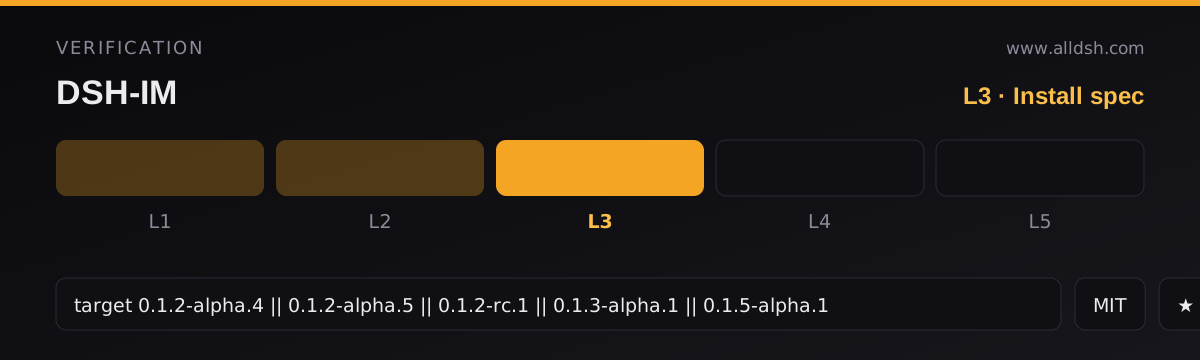
dsh.compatibilityenumerates exactly five releases ascompatible:0.1.2-alpha.4,0.1.2-alpha.5,0.1.2-rc.1,0.1.3-alpha.1and0.1.5-alpha.1, and declaresprofiles: ["web"]. The README repeats the same five as verified, so the oldest is the real floor; this listing records that five-version set verbatim asdshTarget. - Runtime dependencies are six pinned packages:
@tencent-connect/qqbot-connector,@tencent-connect/qqbot-nodejs,@wecom/aibot-node-sdk,dingtalk-stream,qrcodeandundici. The heavier transport libraries sit indevDependenciesbecause the shippedlib/is prebuilt. - Declared seams: the
dshblock has three keys —bundle,clientandcompatibility.bundlepoints at a singlecordis.patch.ymlwhose only operation is oneinsertof thexmanrui-dsh-imrow;clientdeclares awebplatform and injects five@deepseek-ai/dsh-client-*packages. No headless or CLI-mode declaration. - No install-time scripts.
scriptsholds onlybuild,testandcheck— nopreinstall,install,postinstallorprepare— so installing the published package runs no project code. The GitHub-source path (npx -y github:xmanrui/dsh-im install) does build from source. - Telemetry: none described, and no analytics client appears in the source or shipped code. The only non-platform endpoints found are
registry.npmjs.org, contacted only when you press Check for updates, and a Cloudflare Worker in this repository serving a static SVG badge the README references.
Known limits
- Per-channel support is uneven. File and image delivery is gated by each platform’s permissions, quotas and account tier: WeChat needs the binding protocol and conversation to support native file messages, QQ has a daily upload quota, and Feishu’s upload API caps files at 30 MB. Inbound images are JPEG/PNG/WebP, 5 MB each and 20 MB per message.
- iMessage is an MVP. Text DMs only — no groups, attachments, rich text, quote replies, reactions, edits or unsend. It needs macOS, a signed-in Messages.app in the Host’s user session, Full Disk Access for
chat.db, and Automation permission to send. One identity (macos-messages) per macOS user account, and the channel notes callchat.dba private, unstable database rather than a public API. - Replies are chunked: WeChat sends the final reply in 1,800-character pieces and WhatsApp splits long replies.
/stopis scoped to the chat’s turn, not the session. - Defaults are permissive on several channels and per bot; connecting DingTalk, WeCom, Slack, Discord or iMessage without opening the access page leaves the bot open. Changing a bot’s model, effort or preset applies only to later new Sessions, so an existing chat needs
/newfirst.
When to use it — and when not to
Use it to reach the agent where you already talk to people: your own WeChat or Feishu account, a small team’s Slack or Telegram, a Discord server. The Session-level commands are the interesting part — /session to bind a chat to an existing Session, /workspace and /preset to choose where and how new Sessions run, /steer and /batch to shape a running task — plus per-bot file delivery, which returns any readable file as a native channel attachment.
Do not use it to expose an agent to other people. It bridges to your local Harness: there is no documented per-user workspace, no approval isolation, and on five of the ten channels the initial policy admits every sender the platform names. If you connect a group-capable channel, treat the access page as required configuration and check what identity your platform hands the bot before assuming an allowlist entry will match. If you only want notifications, a push integration is a smaller surface — dsh-notifier covers 27 outbound channels with approvals, and dsh-notification needs no credentials at all; if you want the official WhatsApp Business API, this is not it.
FAQ
Is a message to the bot the same as driving a tool-capable agent?
Mechanically yes, with one caveat. The message is forwarded into a Harness Session configured with that bot’s workspace, model and Agent Preset, so the agent can use its tools there. Unless the sender is admitted as command-capable, it cannot run plugin commands such as /new, /workspace, /model or /compact. Ordinary text, answers and tool approvals are gated by the access policy only.
Who can message the bot by default?
It varies by channel, and the answer comes from the seeding code rather than the README. WeChat starts on an empty allowlist with the scanning owner privileged; Feishu and QQ start on an allowlist unless the owner id is *; Telegram starts open, carrying any existing allowlist in; WhatsApp starts on self-chat only. DingTalk, WeCom, Slack, Discord and iMessage start open to any identifiable sender, and so does QQ’s group scope.
Is there an authentication or allowlist mechanism?
Yes, two documented layers. Each channel keeps its native trigger rules — group mentions, replies, threads, per-platform group permissions. Behind them sit the shared access policy, the per-user canExecuteCommands flag and the non-editable owner bypass. The sources do not describe authentication of the person behind a platform identifier, a shared secret on inbound messages, or a rate limit.
Do I need to create my own bot application?
On most channels, yes. Feishu, DingTalk, WeCom and QQ either register one for you through the QR flow or accept credentials from an app you already created. Slack always needs an app you create from the bundled manifest; Telegram and Discord need a token you generate on the platform; WeChat and WhatsApp bind an account or link a device. You own whatever you connect, including its platform-side scopes and quotas.
Does it need a public IP, a port forward or an always-on server?
No public IP or forwarded port — every channel connects outward. It does need the Host process running, because the channel runtimes live inside it rather than in a separate daemon; iMessage additionally needs the Host in the signed-in Messages.app’s macOS user session.
Where are the tokens stored?
Per the README, only in the local Harness Host’s protected credential provider, and no RPC response returns them. The source matches: the WeChat config store keeps only a derived reference such as DSH_WEIXIN_BOT_TOKEN_<24 hex>. The README also states the update installer keeps only the profile’s latest job and manifest backup, and copies no bot credentials.