What it does
A persistent widget in the bottom-right corner of the DSH Web interface: a whale-girl character whose speech bubble shows your DeepSeek account balance, today’s spend and the cost of the turn that just finished. It keeps its own local ledger, alerts you when the balance or a daily budget crosses a threshold, and can play a sound when a reply completes.
The part easiest to misread is what it is not: it is not a session feature. It injects one <script defer src="/dsh-whale/widget.js"> tag into the served page and subscribes to session/event for token counts. It registers no tools, no slash commands, no Cordis service and no memory; nothing in the sources touches the model, the prompt or the conversation. The README calls the accounting “小鲸鱼记账” — the whale’s own ledger, not a change to how DSH runs or bills anything.
Where the balance actually comes from
It calls an official endpoint directly, and your key goes nowhere else. The host half declares BALANCE_URL = 'https://api.deepseek.com/user/balance' and performs a single fetch to it with Authorization: 'Bearer ' + cred.value and an AbortSignal.timeout(20000). There is no intermediary service and no proxy run by the author; the README names the same endpoint and the one credential it needs.
The key is read from DSH’s own credential service, ctx.credentials.resolve('DEEPSEEK_API_KEY'), and sent as a bearer token. With no credential configured the route returns { ok: false, code: 'NO_KEY' } and “未配置 DEEPSEEK_API_KEY” rather than failing quietly. Keys you add for other vendors go through ctx.credentials.set(...), and the comment above that registry states the registry file holds no plaintext key — it stores the credential name (for example OPENROUTER_API_KEY) instead.
Two checkable details on the outbound traffic. The client half never calls api.deepseek.com; it requests the local /dsh-whale/balance.json and lets the host make the one external call. And grepping both shipped source files for analytics-style hosts (telemetry, analytics, sentry, posthog, mixpanel, umami, gtag, matomo) returns nothing — every URL in them is the local route prefix, a model-vendor API endpoint, or a vendor documentation or top-up page. No privacy statement appears among the sources, so treat the code as the evidence rather than a policy.
Two number pipelines, only one of them remote
- Balance is the one real remote read. It is cached 25 seconds server-side (
BALANCE_TTL_MS = 25000), refreshed by the client every 60 seconds (REFRESH_MS = 60000) and refreshable on demand by clicking the whale. On a transient network error the README says the last known balance is kept rather than an error shown. - Today’s spend is derived, and the README says it needs no token: the plugin differences the observed balance against the day’s baseline and books the decrease, while a turn’s cost is computed from the token usage the harness reports for that turn (
inputTokens/cacheReadTokens/outputTokens/reasoningTokens). Prices sit in a table at the top oflib/index.js(PRICING/BASE_PRICE/PRO_PRICE) with peak and off-peak columns, a comment citing the official pricing page, and dated review notes. The README says the built-in DeepSeek entry always uses that table and takes no custom price.
So the bubble’s balance is an API read, while “today used” and “this turn cost” are local arithmetic over observed deltas and reported tokens. That is the line between a measurement and an estimate, and the sources keep the two apart.
Custom providers, and Codex as a data source
A later addition goes well past the built-in read: the README documents 33 vendor templates. Some can genuinely return a balance or quota — OpenRouter, Kimi / Moonshot on both the CN and international sites, StepFun, Novita, GLM Coding Plan, Kimi Coding, MiniMax Coding and OneAPI / New API relays. The rest, including OpenAI, Anthropic, Gemini, xAI, Groq, SiliconFlow, Volcengine Ark, Alibaba Bailian and local models, are labelled “(无余额接口)” because the vendor publishes no key-based balance endpoint. There the plugin probes a probeUrl to validate the key, shows “—” for the balance and estimates today’s spend from session events. The README also records, citing the vendor’s release notes, that SiliconFlow’s balance endpoint was retired on 2026-08-14.
Codex mode carries its own warning: it reads local Codex session logs at $CODEX_HOME/sessions/YYYY/MM/DD/rollout-*.jsonl read-only, with no network and no keys, and the README states that this is partial-interface support and that the widget cannot be installed into Codex.
What it writes to disk
The README documents its runtime files under $DSH_HOME (~/.dsh by default), and the source builds the same names with path.join(DSH_HOME, ...): settings in .dshw-size.json, ledger and usage settings in .dshw-usage.json, custom bubbles in .dshw-bubble.json, the provider registry in .dshw-api.json, ledger overflow in .dshw-usage-archive.json, the Codex cache in .dshw-codex.json, and a monotonic seq in .dshw-turn.json so a hot reload cannot make the front end mistake a new turn for an old one. Uploaded assets go to whale-roles/, whale-audio/ and whale-bubble-imgs/. Purely visual state — position, selected character, snap zones — lives in browser localStorage under dshw-pos, dshw-role and dshw-snap. None of it holds a key.
The host half registers 21 /dsh-whale/* routes through ctx.webServer, each wrapped by a shared registerRoute that first calls connection.requestRejection(req) and rejects with the returned status — 403 for a forged Host header — when a request is unauthenticated or looks like DNS rebinding. The README draws the consequence plainly: a bare curl returns 401, and that 401 is the fence working, not a broken route. The source comments note one exception: if the connection service were missing, the fence fails open and logs a warning.
Requirements
- Harness target — none declared. The README names no harness release,
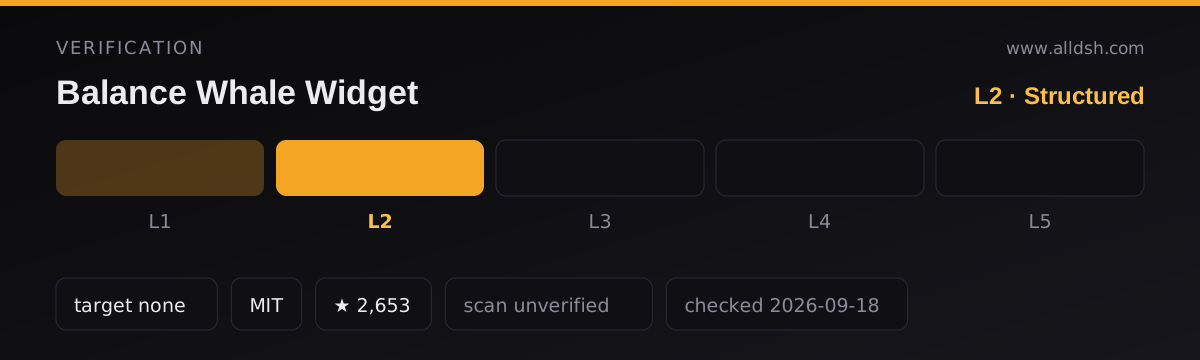
whale-widget-prompt.mdnames none,package.jsoncarries noenginesfield and nopeerDependencies, and itsdshblock declares nocompatibilityentry. Because nothing in the sources states which harness releases this plugin supports, the listing records nodshTargetand stops at verificationL2, rather than claiming a compatibility this directory cannot source. - Web only. The sole
dshblock is{ bundle: { patch: './cordis.patch.yml' } }, and that patch insertsid: dsh-whale-widget. There is noclientplatform declaration: the widget reaches the browser because the host injects a script tag, not because DSH mounts a client package. - Dependencies. The published package declares no
dependenciesand nopeerDependencies; the host imports onlynode:fs,node:os,node:path,node:dnsandnode:url. Its hard dependencies are three DSH services named ininject:webServer,credentialsandconnection. - Install-time scripts: none.
package.jsonhas noscriptsblock at all, so nopreinstall,install,postinstallorpreparestep runs. - Network access is documented; telemetry is not mentioned. The README names the balance endpoint and the vendor endpoints a template may call, and the source holds the matching URLs. No privacy or retention statement appears in the sources, and no telemetry is disclosed.
- Credentials.
DEEPSEEK_API_KEYis required for the built-in balance. The README notes thatDEEPSEEK_PLATFORM_TOKEN, used by an earlier “real-time token” mode, is no longer needed because that mode was retired.
Known limits
- Balance is per-vendor, not universal. The built-in read works only against the official endpoint. Where a vendor has no balance API the plugin shows “—” and estimates; it does not invent a figure.
- “Today used” is bookkeeping, not a bill. It rests on the day’s first balance observation as a baseline, and the README acknowledges it can differ from the official site: balance deltas are the primary measure, and session events are only the fallback when a delta is unavailable — a top-up, a refund, or no baseline yet.
- Web UI only. There is no headless or CLI surface; with no browser page there is no bubble, menu or settings.
- Ledger retention is bounded, at 90 days or 20,000 per-turn entries and 365 days of daily totals, after which records move to an archive file. No cleanup of these files on uninstall is documented — only a
removecommand. - The trust fence fails open if
connectionis unavailable, per the source’s own comment. - Codex support is explicitly partial by the README’s callout, and the subscription-window display is described there as unverified against a real subscription sample.
- No published security scan.
security: unverifiedmeans exactly that: the sources describe credential handling and the route fence, but no audit exists for this listing.
When to use it — and when not to
Use it if you want a glanceable balance and burn rate in the DSH Web GUI and would rather the number came from the official balance API than from a platform session token, or if you hold keys for several vendors and want one place to validate them and track quota. The per-turn cost bubble is the part with no obvious substitute, because it reads the harness’s reported token usage rather than guessing from text length.
Do not install it expecting billing truth. “Today used” is derived from balance differences and can diverge from the official site, and the per-turn figure is computed against a price table shipped inside the plugin, so an official price change between releases shows up as a wrong amount until the package updates. Do not install it on a headless or CLI-only DSH either — every surface it offers is browser UI.
FAQ
Does this widget send my DeepSeek API key anywhere other than DeepSeek?
The sources say no, and they are specific enough to check. The host performs exactly one external fetch for the built-in balance — https://api.deepseek.com/user/balance with Authorization: Bearer <key> — and the README documents the same endpoint. The key is read from DSH’s credential service and never written into the plugin’s config file. The client half does not call api.deepseek.com at all; it requests the local /dsh-whale/balance.json and the host makes the outbound call. Keys you enter for custom providers go into the same DSH credential service, and the registry file stores only the credential name.
Will it change how my sessions behave?
No. It registers no tools, no slash commands and no Cordis service. It injects one script tag into the served page and subscribes to session/event for token usage and session/disposed to drop stale per-session buffers. Nothing in the sources rewrites prompts, alters model routing or shortens a conversation.
Does installing it run any code?
No. The published package.json has no scripts block, so there is no install, preinstall, postinstall or prepare hook to execute. The plugin starts working when DSH loads it into the web profile.
Is the balance figure authoritative?
The balance is a direct read of GET https://api.deepseek.com/user/balance, cached 25 seconds server-side and refreshed every 60 seconds, so treat it as an API read that may be up to a minute old rather than a live stream. “Today used” and the per-turn figure are not reads: the first is a difference against the day’s first observed balance, the second arithmetic over reported token usage against the price table in lib/index.js. The README itself notes today’s figure can differ from the official site.
How does it compare with other whale or balance plugins?
This listing does not make that comparison, and you should not read one into it. More than one whale-themed or balance-displaying DSH plugin exists, including ones by other authors, and their data sources can differ in exactly the way that matters here — whether the number is read from an official balance API, derived from local logs, or estimated from session events. Check the data source and the credential handling of whichever one you pick.