What it does
dsh-notifier puts one notify() call in front of 27 delivery channels, then adds the things a notification alone cannot do: answer an approval, answer a question, and stop a runaway turn — all from the phone that already received the message.
Two trigger lines feed the same core. The harness pushes session events on its own (turn/end, approval/asked, agent/error), debounced and deduplicated; and the model calls a notify tool directly with { message, channel, title }. Every message then resolves through one chain — level (timeSensitive / active / passive) → routing (a multi-agent × channel matrix) → channel adapter — so per-channel delivery semantics such as silent push, priority headers or @-mentions follow from the level rather than from per-call special cases.
Outbound-only would already be a complete plugin. What makes it more than that is the reverse direction.
The half that is not a notifier
Six of the channels also open inbound, over long-lived connections or long polling, so no public IP or port forward is required (only the WxPusher callback needs one). Through them:
- Remote approval. Answer an approval from your phone. Telegram and Feishu get native cards, QQ gets native buttons in 1:1 chats, and channels without cards fall back to a numbered reply. Group destinations use a safe text fallback. The README’s rule is blunt and correct: silence never approves, and decisions are single-use and fail-closed — unknown sources and QQ group control are rejected by default.
- Remote questions (
ask_user). The model asks you multiple-choice questions on your phone: one to four questions, two to five options each, multi-select supported. Telegram’s single-select cards also carry custom-answer and skip buttons, token-checked with first-arrival-wins. An out-of-range answer re-prompts without voiding the question, and a timeout never fabricates an answer. - Remote conversation. Plain text becomes
followuporinject; a!prefix steers mid-turn; a merge window reassembles the way people actually type on a phone. - Session control.
/stopcancels the turn,/quietand/unquietmute a session’s pushes, and the/agentfamily rebinds which session a chat is driving.
Long turns are covered too, and on by default since v0.5: a heartbeat after 15 minutes and then every 15 minutes, a stall alert after 10 minutes of silence, and a ⏹ stop button on the Telegram and Feishu cards using the same one-time-token chain as approvals. turnStart is deliberately off, and the README’s reason is a good one — one message per turn is noise when you are at the desk, and you turn it on when you are not.
Identity is a runtime object rather than a YAML list: pairing codes (/pair <code> in any DM, first redeemer becomes owner), composite-key bindings (channel:userId, so a Telegram-bound id does not admit a Feishu message), role management, and rejection receipts that tell an unbound sender how to get in. An empty whitelist boots into a guided state with a bootstrap pairing code written to a local 0600 file — the log prints the path, never the code — instead of refusing to start.
27 outbound channels, six that answer back
The channel matrix is generated from the code (node scripts/gen-channel-matrix.mjs), which is a good sign: it is a registry, not a README table that drifts. The set spans three kinds of destination:
- IM platforms — Telegram, Slack, Discord, Feishu, DingTalk, WeCom (group robot and app message), QQ bot, OneBot, Microsoft Teams, Mattermost, Google Chat.
- Push services — Bark, Pushover, PushDeer, Chanify, ntfy, Gotify, iGot, WxPusher, PushPlus, Server酱, Qmsg, 息知. Several of these are China-market apps, which is where this plugin’s coverage is genuinely wider than most.
- Local and generic — a terminal bell, a native desktop notification (
osascript/notify-send/ a PowerShell toast), and a plain webhook.
Inbound is the six listed above: telegram, feishu, qq-bot, wxpusher, wechat and dingtalk.
Requirements and install
-
Node
>=22. -
Harness: the README states
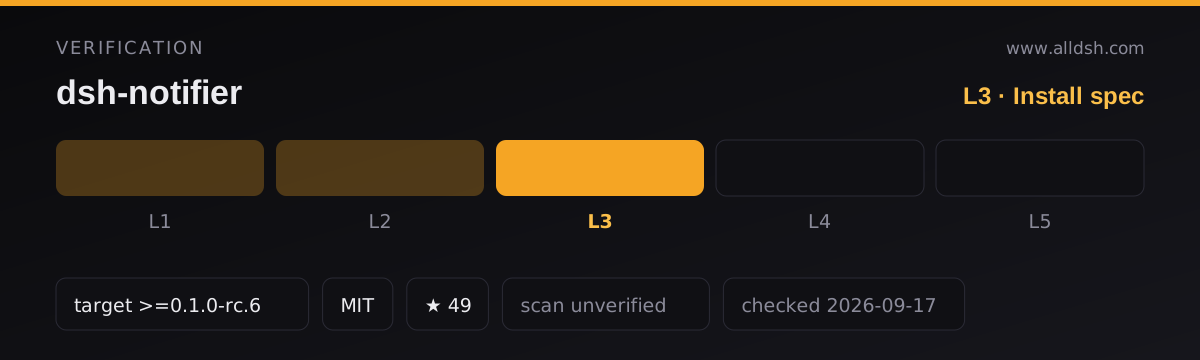
--profileis required from DSH0.1.0-rc.6+, and the manifest’s compatibility block lists0.1.0-rc.6. This listing records the floor as>=0.1.0-rc.6— the author’s own0.1.0-rc.6+rendered as a semver range — and that declaration is what makes it L3. -
From npm (published,
0.10.2at the time of writing):dsh plugin --profile web add dsh-notifierThe README writes the same command with the flag last (
dsh plugin add dsh-notifier --profile <profile-name>); the order does not matter, the profile name does. -
Then restart DSH and open the link the startup line prints —
http://127.0.0.1:<port>/#token=.... The token lives only in the URL fragment and is printed once; port conflicts fall back to a free port automatically. The first-visit wizard walks you through channel → credentials → “send a real test notification”, and setup is finished when your phone buzzes. -
Uninstall:
dsh plugin --profile web remove dsh-notifier.
What it declares, and what that costs you
Two things are worth reading before installing, and both come from the package rather than the prose.
It asks for a lot of permissions. The manifest declares harness:tool, harness:event, network:outbound, network:listen, file:read, file:write, subprocess:exec and credentials:write. Some of that is unavoidable — an HTTP listener for the console, credential storage for 27 channel tokens, a subprocess for desktop toasts — but credentials:write plus subprocess:exec is the combination to notice. The mitigation is structural rather than promised: secrets are typed role('secret') and redacted everywhere, and ${ENV:NAME} references keep them out of the profile.
Zero runtime dependencies is not a slogan here. dependencies is empty. The two entries in optionalDependencies are exact-pinned and lazily imported, and their absence degrades one channel with an install hint instead of breaking startup. There is also a licensing decision worth crediting: @tencent-connect/qqbot-connector is not a dependency, because npm flags it UNLICENSED — the README states it stays a design reference only and is never copied, redistributed or introduced as a dependency.
A test count, reported. The package declares dshQuality.testCount: 1616 and the README repeats “1616 automated contract tests (1616 pass)”. This directory did not run them; that is the author’s claim, and it is recorded as one.
Configuration
Channels live under config.channels:
insert:
  - id: dsh-notifier
    config:
      channels:
        - type: telegram
          botToken: "123456:ABC-DEF..."
          chatId: "987654321"
        - type: feishu
          webhook: "https://open.feishu.cn/open-apis/bot/v2/hook/..."
        - type: serverchan
          sct: "SCT..."
Optional blocks each opt in under their own key — inbound (allow users; first import only, managed at runtime afterwards), approval (mode: answer), conversation (mergeWindowMs), route (sessionTtlHours), admin (on by default, loopback only), events/keywords/graceSeconds (anti-disturb gates), digest (ledger plus a daily summary), and the v0.5 status line (longRunning.firstAfterMs: 900000).
The status line defaults matter more than they look: longRunning and stall are on with a 15-minute first heartbeat and a 10-minute stall threshold, and all timings clamp to a 60-second floor. That means a long task is no longer a black box out of the box — and also that a session which goes quiet will page you. Both are configurable, and both can be switched off with enabled: false.
Known limits
- The author is on exam leave until 2026-10-01. The README opens with a maintenance notice: until that date the author cannot promptly maintain the project or review PRs and issues, and replies will be delayed. This is a declared, temporary window, not an abandoned project — the last push was 2026-09-13, three days before this listing — but if you need upstream responsiveness this month, plan for the delay.
- Outbound config changes are “view-hot, delivery-cold”. Saving a channel in the admin console updates the UI immediately and badges the card “重启后生效”; the delivery layer merges runtime config only at the next plugin startup. Test-send is the exception and runs against the latest config at once. This is documented honestly and it is still the most likely thing to confuse you.
- The web console is a second control surface, and it is one. It binds loopback only and authenticates with a bearer token carried in the URL fragment, which is a reasonable design — but it is still an HTTP listener on your machine with
credentials:writebehind it. Treat the printed link as a secret. - Six channels can drive the session, and five of them are chat platforms. The identity system is genuinely careful (single-use decisions, fail-closed, composite-key bindings, group control refused). The residual risk is the ordinary one: whoever holds your phone can approve.
- Star counts disagree with themselves. This listing records the live figure, 49. The nightly index recorded 95 for the same repository — a decrease, not a typo, and a reminder that stars measure accumulated exposure and can move in both directions.
- The name space is crowded. In the nightly index, 144 repositories carry “notif” in their name and 119 of them sit at 0–2 stars; this is one of only two above 50. It is also one keystroke away from
dsh-notification, which is a different project by a different author with a different install path. Read the last four characters. - Stars (49) are attention, not review. This listing records
security: unverified; no third-party scan or independent audit is on record, and no listing on this site claims L4 or L5.
When to use it — and when not to
Use it when the session outlives your attention and the phone in your pocket is where you want the decision to land. The interesting capability is not the 27 channels — it is that an approval, a multiple-choice question and a stop button all arrive with the notification, so you can keep a long run moving without going back to the desk. If you already use a China-market push app, its coverage is wider than most of the field.
Do not install it because it is the biggest notifier here. It asks for credentials:write and subprocess:exec, it stores channel credentials, and it opens an inbound path from six platforms into a session that has tools. If the machine running the harness is the machine you are looking at, dsh-notification does the job with no credentials at all and nothing added to the model’s context. If what you want is to hold an actual conversation with the session from a chat window, dsh-im is the more direct shape — with its own, larger access-control obligations.
FAQ
Is it a notifier or a remote control?
Both, and the split is clean. Outbound is a notifier: 27 channels, level routing, retries, segmentation, anti-disturb rules, a ledger. Inbound is a remote control for six of those channels: approvals, questions, conversation and /stop. You can use the first half and never enable the second — inbound is opt-in.
Does it need a public IP or a port forward?
No. Every channel is reached outbound over a long-lived connection or long polling. The single exception named in the README is the WxPusher callback, which does need to be reachable.
What happens if a channel is misconfigured?
Startup survives. A misconfigured channel is skipped silently with a log line, which is the right failure mode for a notifier — the alternative is a plugin that refuses to boot because one push service changed its API.
Can other plugins send through it?
Yes, and it is a documented contract rather than an accident. Another plugin injects the notifier service (ctx.inject(['notifier'], …)) and shares the config, routing, ledger, rate limits and flush, or subscribes to delivery metadata via ctx.on('dsh-notifier/sent'). Broadcast and directed sends each produce one audited event, and message text is never exposed. Per-source rate limiting is 10 per minute, with a 20,000-codepoint clamp and a never-reject API.
Where do the credentials live?
In the profile and the runtime store, with ${ENV:NAME} references supported so the values can stay in the environment. Secrets are typed role('secret') and redacted wherever they would otherwise be rendered, and the console’s credential forms show masked values — untouched masked fields are never resubmitted.