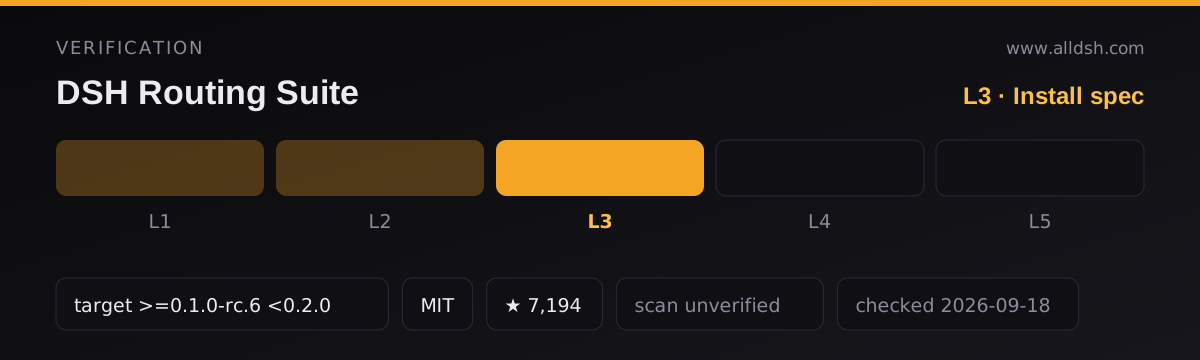
What it does
One GitHub repository ships three separate things installed three different ways. The most common misreading is that the repository is a plugin — it is a distribution container. The root package.json says so: its name is @dsh-external/dsh-super-injector, pointing at one component, while the description calls itself the “dsh-routing-suite distribution entry”.
injector/— the plugin half. Assembled through the official path, it publishes adev_*tool family that injects, hot-reloads, uninjects and self-checks other local plugin packages.preset/— two agent presets (router-standard,router-spec) that replace a session’s reasoning persona and tool manifest.graded/— a session-level task protocol with six tools, a brainstorm quiz, spec gates, check-ins and a redteam gate.
A single command assembles the injector. It does not install the presets and it does not install graded.
Three components, three install paths
The upstream README’s headline command is:
dsh plugin --profile web add github:yjh051108/dsh-routing-suiteThat assembles the injector only. The repository’s own three-step chain documents what the other two need:
git clone https://github.com/yjh051108/dsh-routing-suite.git
cd dsh-routing-suite

dsh plugin --profile web add .\injector         # the injector

$target = Join-Path $env:USERPROFILE '.dsh\.agent-presets\router-standard'
Copy-Item -Recurse .\preset\router-standard $target   # each preset, copied FLAT
The README warns not to copy the whole preset/ directory, because the extra nesting hides the presets from discovery. That matches how DSH behaves: @deepseek-ai/dsh-agent-presets scans the preset root one level deep and requires each preset directory to hold its composition file directly.
graded/ is a third path. The repository carries a built tarball, graded/dsh-external-dsh-graded-mode-0.0.1-rc1.tgz, but graded/README.md leaves <NPM_GLOBAL>, <DSH_HOME> and <PLUGIN_DIR> as placeholders for you to replace — a documented gap, not a ready-to-paste command.
What the injector actually does
The injector/ README calls itself a “BepInEx-style mod injection entry” for DSH. The sources describe something narrower: it symlinks (junctions on Windows) a local plugin package into ~/.dsh/profiles/web/node_modules, then calls ctx.loader.create({ name, config }) to mount it into the running process. The root cordis.patch.yml inserts exactly one row — the injector itself — so it is the only entry needing official assembly. It keeps a manifest at ~/.dsh/super-injector/registry.json and re-establishes injected packages after a restart, watches plugin output directories and hot-reloads on change, and on uninject disposes the fiber and removes the junction.
On “does it modify DSH’s own files”: it does not patch harness source, but it does write into your DSH profile — a link under the profile’s node_modules, and entries in ~/.dsh/profiles/<profile>/cordis.patch.yml, including a disabled: true entry appended on uninject so the removed plugin’s bundle patch cannot re-assemble itself. The README also documents a dev_fix_patch repair path for profiles carrying duplicate loader entry ids.
The injector’s package.json declares peerDependencies as ranges (@deepseek-ai/dsh-tools: >=0.0.1-rc <2, cordis: >=4.0.0-rc <5) and a dsh.client block injecting two client packages on platform web.
What the presets actually replace
preset/router-standard/agent.cordis.yml is not a small patch. It is a complete agent-plane composition: persona, agent-instructions, the router bootstrap, then filesystem, search, editor, jobs, skill, goal, plan-mode, compaction, delegation, workflow, ralph, ask-user, todo and web rows, plus a Windows-only group substituting a private shell service backed by ./gitbash-executor.mjs.
Mounting it therefore hands the agent a different persona and tool manifest than the deployment default, including a compaction config with explicit thresholdRatio, retainRatio, thresholdChars, headChars and tailChars values. The preset registers its own dev_router_status, dev_router_mode and dev_mode_subagent tools from its bootstrap module — it does not require the injector, though the preset README presents the two as intended to be used together.
Install-time code execution
The root package.json declares "prepare": "node injector/scripts/prepare.mjs", and npm and pnpm run prepare automatically for github: dependencies — exactly how the headline command fetches this repository. Installing this package executes code.
injector/scripts/prepare.mjs is short and its behaviour is verifiable from the file. It checks whether injector/lib/index.js and injector/lib/client.js already exist; if both do, it prints [prepare] lib/ already built — skipping tsdown run and exits 0. Otherwise it builds them with a local tsdown, falling back to npx --yes tsdown@^0.22.14 --config tsdown.config.ts, which downloads a package on first use. If the build fails or the outputs are missing it exits non-zero on purpose, and its own error text says the plugin cannot load without lib/. install.sh can additionally download a Release tarball from GitHub and assemble that.
Requirements
- DSH target: the README declares
>=0.1.0-rc.6 <0.2.0and says it has followedrc.8,0.1.1-rc.2and0.1.2-alpha.1. The same README warns that DSH is in developer preview and that breaking changes are expected. - Node: the root
package.jsondeclares noenginesfield. The injector’s and preset’s own manifests declare>=22. - Client platform:
web, per thedsh.clientblock. No headless or CLI-only mode is described. - Permissions, network and telemetry: the injector states that
DSH_HOMEoverrides ahomedir()-derived path, andinstall.shfetches from GitHub Releases when the source build fails. Beyond that, the sources describe no permission model, approval flow or telemetry. Treat that as undocumented rather than as safe.
Known limits
- No single command installs the suite. The headline command gets you the injector; presets are a manual flat copy; graded is a separate assembly with placeholder paths.
- The repository contradicts itself about its own contents. The Chinese README names the graded artifact as
graded/dsh-external-dsh-graded-mode-0.0.1-rc1.tgzin one place andgraded/dsh-graded-mode-3.2.0.tgz— not in the tree — in the table cell beside it. The English README names only the latter. - The injector’s install manual is partly stale.
injector/INSTALL.mdstill refers to@yjh051108/dsh-super-injectorin its manual-patch and uninstall sections, while the shipped manifests use@dsh-external/dsh-super-injector. Do not mix the two names. - Preset version labels disagree across files. The root README says
v0.3.0 … mainline v1.19.1/v34, the preset README’s status header saysv1.19.1, the bootstrap constant reportsv1.20.0, andpreset/CHANGELOG.mdruns tov1.27.0. - The research claims are the author’s own. The repository publishes P1–P23 probe results, a “model attention slack” study and figures such as routing 96%, convergence 100% and open-task completion “0% → 100%”. Its own
graded/docs/DATA.mddescribes the method as aggregated event counts from named session IDs, with no raw transcripts. I could not independently verify the probes, the sample or the metrics, and none of it is a measurement of what the plugin will do on your machine. - Two repositories share a similar name. npm has a
dsh-routing-suite@0.1.2whoserepositoryfield points atgithub.com/dragonbaba/dsh-routing-suite, a different owner. That package is not this project, which is why this listing carries aninstallcommand rather than a package name.
When to use it — and when not to
Reach for the injector if you develop DSH plugins and want a mount/unmount loop that does not require restarting the web process, or if you want to run a local plugin package without adding it to your profile permanently. Read the presets if you are interested in prompt-level routing and staged tool disclosure with the persona and tool manifest this repository ships.
Do not install it expecting one command to give you all three components, and read the install-time execution path first. If you want a plugin manager that only touches officially published packages, this is the wrong shape: it deliberately operates below the official assembly layer, keeps its own registry, and writes into your profile patch file. Be sceptical of the performance numbers until you reproduce them; the measurement scripts are in the repository, which is the right way to check them.
FAQ
Does one command install everything in this repository?
No. dsh plugin --profile web add github:yjh051108/dsh-routing-suite assembles the injector from the root package. The router presets are installed by copying each preset directory flat into ~/.dsh/.agent-presets/, which the README documents as a separate step and warns cannot be done by copying the whole preset/ directory. graded/ ships as a tarball and is assembled separately, with placeholder paths in its instructions.
Does something run code when I install it?
Yes. The root package.json declares a prepare script, and npm and pnpm run prepare for github: dependencies — the mechanism the headline command uses. The script is injector/scripts/prepare.mjs; it skips if injector/lib/index.js and injector/lib/client.js exist, and otherwise builds them with tsdown, fetching tsdown@^0.22.14 through npx if no local copy is present. install.sh can also download a Release tarball from GitHub.
Does the injector modify DSH itself?
It does not modify harness source files. It links plugin packages into the profile’s node_modules, mounts them with ctx.loader.create, and keeps a manifest at ~/.dsh/super-injector/registry.json. It does write into your DSH profile: a link under ~/.dsh/profiles/<profile>/node_modules, and entries appended to ~/.dsh/profiles/<profile>/cordis.patch.yml, including a disabled: true entry written when you uninject a plugin.
What is the difference between the injector and the presets?
The injector is a DSH plugin assembled through the official plugin path; it contributes dev_* tools and a runtime mount/unmount loop. The presets are agent-plane compositions loaded from ~/.dsh/.agent-presets/; they replace the session’s persona and tool manifest and register their own router tools. Installing one does not install the other.
Which DSH version does it target?
The README declares >=0.1.0-rc.6 <0.2.0, with follow-ups noted for rc.8, 0.1.1-rc.2 and 0.1.2-alpha.1. The same README states DSH is in developer preview with expected breaking changes, so treat the upper bound as a real constraint rather than boilerplate.
Why is the license listed as MIT when the package says BSD-3-Clause?
Because the sources disagree. GitHub’s API reports MIT, and the root LICENSE file is the MIT text, which the README also says. But the root package.json and injector/package.json both declare "license": "BSD-3-Clause", while graded/package.json declares Apache-2.0. This listing records the GitHub API value (MIT) and flags the divergence rather than resolving it.