What it does
dsh-evolve-modes puts a compact workflow control next to the composer and lets you compose how the agent works for this task. The README is explicit that these are not mutually exclusive persona modes — they are four independent decisions you can recombine per task, and the current combination is always visible beside the input:
normal · standard · off · evolution on| Dimension | Options | What it changes |
|---|---|---|
| Working state | normal · plan | Complete the task directly, or enter the official DSH plan workflow |
| Reasoning strategy | standard · first principles · grilling | Answer normally, write out first principles explicitly, or pressure-test the requirement through round-by-round questioning |
| Quality gate | off · adversarial review · acceptance review | Add no review, run an independent agent to hunt for risks, or accept the result against the task and an approved plan |
| Self-evolution | off · on (Propose) | Analyse finished sessions and produce rule proposals for human review |
The README’s most important framing claim: the plugin does not fork the Harness, does not copy the agent loop, and does not modify core code. Plan mode is delegated to the official @deepseek-ai/dsh-plan-mode service, reusing DSH’s own plan persistence and exit_plan_mode approval rather than implementing a second plan system.
It is also unusually light on dependencies for what it does: dependencies are just @deepseek-ai/schemastery and zod. The fourteen peer dependencies (@deepseek-ai/cordis, dsh-agent, dsh-llm, dsh-session, dsh-tools, dsh-subagent, dsh-plan-mode, dsh-storage-domain and the rest) come from the host, and dsh.client injects eight UI packages.
The self-evolution loop, and why its gate matters
This is the part of the plugin that deserves the closest reading, because “self-evolving agent” usually means something worse than what is described here.
The default is Propose. The plugin analyses completed agent collaborations and produces candidate rules; nothing changes behaviour until a human applies a proposal.
3 parent replies completed
        ↓
isolated learning request
        ↓
pending proposals
        ├─ apply  → written to global learned instructions
└─ ignore → no change to later behaviour| Setting | Default | Notes |
|---|---|---|
| Self-evolution | Propose |
On by default for new sessions |
| Learning batch | 3 |
One learning run per three completed parent replies; adjustable 1–100 |
| Max pending proposals | 100 |
Adjustable 1–1000 |
| Learning scope | Sessions with evolution enabled | No project scoping; enabling it on a session enrols it |
| Rule scope | Global | Applied rules cross sessions and are not bound to a directory |
The learning request is deliberately isolated. Per the README it uses a single learning persona/system prompt, receives the batch as one structured JSON user message, and: does not inherit parent session history, does not inherit the parent agent’s working context, does not create a learning sub-agent, carries no tools, and does not load AGENTS.md or CLAUDE.md from the source session’s working directory.
Evidence must be verbatim. Proposals have to be grounded in the user’s own messages; the README rules out assistant inference, one-off task details, implementation results, silence, or “the user did not mention it again” as evidence on their own. Only the most recent 100 learning messages per source session are read, assistant messages are context only, and one longer than 2000 characters is truncated to its first and last 1000 with ... between.
The plugin never writes your project files. Approved rules go into a marked system-prompt section of the plugin’s own storage and are projected in Trajectory; the README states plainly that it does not write AGENTS.md, CLAUDE.md or any project file. Learning failures are recorded on the settings page, unfinished batches are kept for retry, and a failure never blocks the parent agent’s reply.
Quality gates, reasoning and tool policy
Adversarial review starts an independent review agent after the parent reply and looks for unmet requirements, unsupported conclusions, omissions, regressions, counter-examples and security risk. It reports evidence, gaps and follow-ups — and the README states it does not silently rewrite, retry or fix the parent’s answer.
Acceptance review checks the candidate answer against the task and, where one exists, the approved plan. The report uses fixed sections — Met, Gap, Unverified, Evidence, Concrete follow-up — and appears under the corresponding assistant reply. Each quality review costs one extra model call and its latency, and it does not run your project’s test, lint or build commands.
First principles writes goal, facts, assumptions, constraints, derivation and verification into request/header.system, with Trajectory keeping the same instruction as checkable evidence; switching it off affects only later requests and does not delete historical evidence. Grilling builds a decision tree and asks one round of questions whose preconditions are already settled, numbered with recommended answers, investigating discoverable facts itself and waiting for confirmation before implementing.
Tool policy is a workflow policy, not a sandbox. Plan and quality review steer tools through DSH’s tools/pre-execute pipeline; the default allowlist is read, glob, grep, read_image, the configured platform shell and exit_plan_mode. The README is explicit that this is not OS-level isolation.
Requirements and install
-
Node
^22.19.0 || >=24.0.0. -
A DSH release inside the declared range
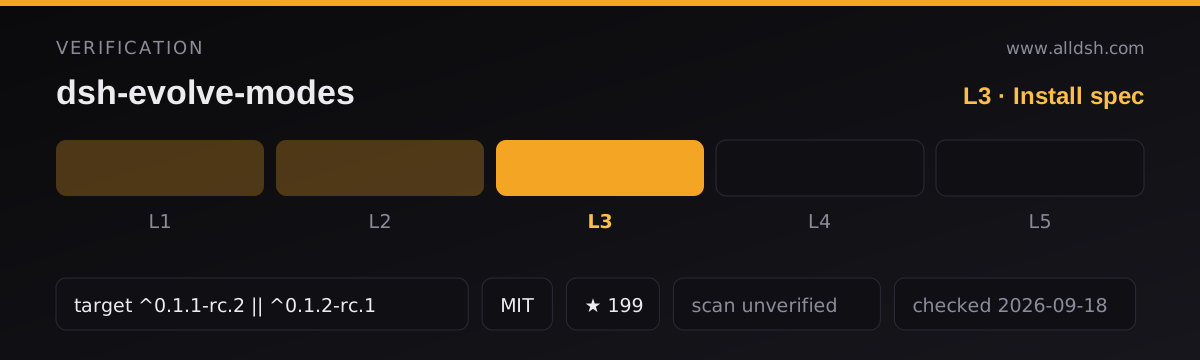
^0.1.1-rc.2 || ^0.1.2-rc.1. That range is what this listing records asdshTargetand it is machine-readable in the manifest’speerDependenciesas well as the README’s compatibility table — which is why the listing is L3. -
Install into the web profile:
dsh plugin --profile web add @graysilver/dsh-evolve-modes@0.4.1npx -y @deepseek-ai/dsh plugin --profile web add @graysilver/dsh-evolve-modes@0.4.1if you have no global CLI. The README recommends pinning an exact version rather than relying on a floating tag, and suggests pinning the Harness release too. A git install by revision is supported for auditing or development, and the README warns that a git install runs install-time code — only install a revision you trust. -
Restart the web profile. The control appears next to the composer tools; the top-level self-evolution mode settings page manages global rules.
-
No install-time lifecycle scripts in the published manifest —
prepublishOnlyruns at publish time, not at install time. -
Services the plugin needs present: the quality gates need DSH’s fork/subagent capability, self-evolution needs the
llmservice, plan mode needs the officialplanModeservice and tool registry, and the plugin overall needs a Harness with the web plugin loader, client UI slots, storage domain and Trajectory. -
If the target profile registers a shell tool under another name, override it in the bundle:
- id: dsh-evolve-modes config: shellTool: bash -
Commands are available from the composer or the command API:
/evolve-modeplusworking execute|plan,reasoning standard|first-principles|grilling,quality off|general-review|acceptance-review,evolution off|propose|batch-size <n>|max-pending-proposals <n>,review <id>andreviews. The legacy aliasesnormal,first-principlesandadversarial-reviewstill migrate, mapping the old single mode onto the new dimensions while keeping your current evolution settings.
Network and data
State lives in the plugin’s own storage domain and survives service restarts and session reloads. Version 0.3.0 migrates older session settings, proposals, approved rules, backups and learning records automatically, without overwriting data already present under the new names.
Learning sends session content to the model. That is the mechanism, not a side effect: the plugin extracts recent user messages from sessions you have enrolled and sends them as a structured batch to the configured model, then stores the resulting proposals. If a conversation must not be summarised by a model, do not enable evolution on that session — enrolment is the consent boundary the README describes.
Backups are automatic and restorable. Every change is preceded by an automatic backup the settings page can restore from.
No telemetry is documented beyond what the plugin’s own model calls require. This listing is security: unverified; no third-party scan or independent audit is on record.
Known limits
- Per-turn inline review only renders on
0.1.1-rc.2. Harness0.1.2-rc.1removed the per-turn footer and command-view slots; the plugin capability-detects this and skips those extension points, so review commands and persisted records still work but the inline per-turn display does not appear. - The supported window is narrow by design.
0.4.1covers0.1.1-rc.2and0.1.2-rc.1;0.3.1is the last release for0.1.0-rc.6, and0.3.0and earlier are no longer supported. Pin both the plugin and the Harness. - Quality review costs a model call per completed parent reply and adds its latency. There is no free setting for it.
- Reviewers report, they do not repair. Neither gate runs your tests or fixes the parent’s answer; the follow-up list is for you.
- Tool policy is not isolation. The allowlist is enforced through a workflow pipeline, not the operating system.
- Self-evolution is bounded on purpose. Batch size, pending-proposal cap, message window and the 2000-character assistant truncation all mean the learning input is a sample of the session, not its full record.
- Grilling is adapted third-party work. It comes from Matt Pocock’s Grilling skill, with attribution in
THIRD_PARTY_NOTICES.md. - Stars (198) are attention, not review. No listing on this site claims L4 or L5, and this one does not claim a smoke-tested install.
When to use it — and when not to
Use it if you want per-task control over how the agent approaches work without adopting a whole agent framework: plan approval for high-impact decisions, an independent reviewer for deliveries, first-principles or grilling when the requirement itself is the risk, and a proposal-only learning loop if you want the agent to notice your recurring preferences without acting on them. The README’s own pairing table is a reasonable starting point — for example plan · first principles · off for high-impact decisions and normal · standard · acceptance review when you want delivery checked.
Do not install it expecting automatic self-improvement — the design deliberately refuses to apply a rule without a human, which is a feature and also the reason it will not “just get better”. Do not treat the quality gates as a test suite: they add an opinionated second model call, not coverage. And if you are on Harness 0.1.0-rc.6 or floating tags, pin first — the plugin’s own compatibility table is the contract.
FAQ
Does it modify my AGENTS.md?
No. The README states the plugin uses only its own persistence and writes neither AGENTS.md, CLAUDE.md nor any project file. Approved rules live in a marked system-prompt section of the plugin’s storage and are projected in Trajectory.
Does self-evolution change the agent automatically?
Not by default. The default is Propose: it produces candidate rules that wait for you to apply or ignore them. A proposal that is ignored changes nothing.
What does the learning request actually see?
Only an isolated batch. Per the README it does not inherit the parent session history or working context, creates no sub-agent, carries no tools, and does not load the source session’s AGENTS.md or CLAUDE.md. It reads at most the most recent 100 learning messages per enrolled session, keeps each turn’s full user message plus the last visible assistant message, and truncates a long assistant message to 1000 + 1000 characters.
Do the review gates run my tests?
No — and the README says so explicitly. They add a model-based review pass that reports Met / Gap / Unverified / Evidence / Concrete follow-up; running the project’s own test, lint or build commands is left to you.
Which Harness release should I pair it with?
Whichever the compatibility table says. 0.4.1 supports 0.1.1-rc.2 and 0.1.2-rc.1, and the same range is machine-readable in peerDependencies. Older Harness releases need the matching older plugin — 0.3.1 for 0.1.0-rc.6.