What it does
DSH Taskboard adds a project task board to DeepSeek Harness: projects, tasks with readable keys such as DSH-42, comments, relations, attachments, saved workflows and a scheduler. Its README states the authority split plainly — SQLite alone owns task state, while sessions, goals, workspaces, tools, permissions and conversation history stay with Harness.
The sentence most likely to be misread is “no iframe, no second chat runtime.” It is a claim about integration, and it covers two things:
- The UI is native — a sidebar control and an overlay page served by the plugin’s own client half from bounded Remote snapshots over the existing Typert connection, not an
<iframe>embedding a separate web app. - The agent side is not a parallel runtime. The architecture document says the automation driver “never imports
agent-loop”. It creates or resumes a root Agent through public services, mounts the preset and model route, selects the workspace working directory, creates a Goal, and persists an ordinary user message — so task work runs as a normal Harness session under Harness’s own permission model.
So it is not a second orchestrator with its own model calls and approval path — it is a task database plus a scheduler that starts ordinary Harness sessions.
The claim and review loop
Seven statuses exist: backlog, todo, in_progress, in_review, done, plus blocked and canceled. The documented flow:
human creates backlog
  -> human approves to todo
  -> Agent or automation claims (dependency recheck + exclusive claim + Session)
  -> Agent works in the bound Workspace / branch / worktree
  -> Agent verifies and submits in_review
  -> human accepts done, or returns to todo / in_progress
How an agent claims work. Through taskboard_claim, which takes a task_id and an expected_version. The tool description says the service “rechecks dependencies and exclusive ownership in the same transaction”. Only eligible todo items can be claimed, and the README adds a detail that matters for recovery: orphaned claims stay visible and are not silently stolen.
Who reviews. A human. The README states it twice: agents submit verified work to in_review, “only an authenticated human UI or CLI operation can accept it as done”, and “Goal completion never accepts a task.”
Automatic transitions. Partly. Approving to todo, claiming, submitting to in_review, blocking and releasing are all real transitions, but acceptance is never automatic — it is a human “Accept” click or the CLI task accept, and automation stops at in_review too.
A second gate applies throughout: every mutation except create carries the exact current version, and TASK_STALE_VERSION means reread rather than retry.
What agents can and cannot do
The model-facing surface is eight tools — taskboard_list, taskboard_get, taskboard_claim, taskboard_comment, taskboard_submit_review, taskboard_block, taskboard_release_claim, taskboard_relate — with a source comment saying the set “intentionally contains no accept or generic status mutation”. Accept, delete, archive and force takeover are human-only. A packaged skill, manage-taskboard, tells the agent to taskboard_get immediately before a write. Defaults bound concurrency at 2 claims per project and 4 globally, with allowSharedWorktrees: false meaning one development context per piece of work.
Automation, and what “workflow” means here
An automation is configured per project: interval, agent preset, model route, worker count and quota policy, with the interval floored at 30 seconds. When enabled, the Host scheduler claims eligible todo work, drives a root agent session and goal, and stops at in_review.
One candid note is worth repeating because it is unusual to find in a README: Harness currently exposes no proactive quota signal, so the plugin reports quota as uncertain. New rules default to ignore; choosing pause-on-uncertain deliberately prevents new claims without cancelling running work.
Workflows are narrower than they may look. Assigning one renders its ordered document into the agent’s task instruction as guidance; the scheduler does not invoke workflow nodes automatically. executable on a node means a Host provider is registered for that node kind, not that assignment turns the workflow into a runner.
Where the data lives
Two bounded locations, both configurable and both resolved on the Host side: databasePath, default .dsh/taskboard.sqlite (env DSH_TASKBOARD_DATABASE), and attachmentRoot, default .dsh/taskboard-attachments (env DSH_TASKBOARD_ATTACHMENTS). Attachments cap at 25 MiB per file and 100 MiB per task.
Read the default path carefully. The README says the Host resolves paths and the browser cannot choose them, but the code calls resolve(config.databasePath) in the service constructor, so a relative default resolves against the process working directory rather than $DSH_HOME. The repository’s own open issue #23 documents it failing in the wild: a database silently created under ~/.claude/.dsh/ because the Harness process inherited that directory. If you care where the file lands, set an absolute path.
Backup and migration are documented: copy the SQLite file, its WAL files while live, and the attachment directory, stopping Harness first. To relocate, stop Harness, move both, and point the two settings at the new paths. A database from a future schema revision is refused, while older revisions migrate forward.
A headless CLI, dsh-taskboard, emits schema-versioned JSON across project, task, relation, attachment, workflow, automation and storage groups, exiting 0 on success, 2 usage, 3 service unavailable, 4 domain error and 5 on optimistic conflict.
Requirements
- Node
^22.19.0 || >=24.0.0perengines— built on Node’s ownnode:sqlite, not a native addon, and the README recommends Node 24. pnpm 11 is the declared package manager. - Harness
0.1.2-alpha.2, declared in the README as the compatible Host, with a web profile. Note the version discipline: the peer dependencies pin many@deepseek-ai/*packages to exactly0.1.2-alpha.2, and the repository’s last commits were CI fixes to build against that release. The published npm0.1.4tarball is slightly older and its bundled README names0.1.2-alpha.1instead. - Write access to
$DSH_HOMEand the ability to restart Harness. Composition and client-module scanning happen only at boot, so a restart is part of the install, and it interrupts in-flight agent turns. - Dependencies:
zodis the only runtime dependency; React^18.2.0and many@deepseek-ai/*packages are peers resolved through the profile’s fallback links. - No install-time code. The package declares only
build,test,typecheck,checkandexample— nopreinstall,install,postinstallorprepare— so installing it runs no code. The README still warns generally that pnpm runs lifecycle scripts and that you should install only packages you trust. - Network and telemetry. The README says network access is needed only to clone the repository and install Node dependencies; no telemetry is documented and no analytics dependency appears in the manifest or host source. What the sessions the scheduler starts may run is Harness’s permission model, not the plugin’s. No third-party scan of this package is on record.
- Installation is build-and-pack. The README’s procedure is
pnpm install,pnpm build,pnpm pack, thendsh plugin --profile web add -w <tarball>— the workspace-root flag is marked mandatory.lib/is gitignored, so the published git tree has no compiled bundle, and the README warns twice against adding the repository as a raw plugin source. The published npm tarball does ship the compiledlib/bundle andcordis.patch.yml, so adding the package by name is plausible, but the README does not document that path.
Known limits
- Version lag is the immediate risk. The repository pins harness
0.1.2-alpha.2in its peers. Whether it runs on a newer harness is not stated by either source. - The default database path is not anchored to
$DSH_HOME. Open issue #23 reports it silently creating a database in an unrelated directory, with no maintainer reply when checked. - Workflow assignment is guidance, not execution, and quota handling is explicitly uncertain because Harness exposes no proactive quota signal yet.
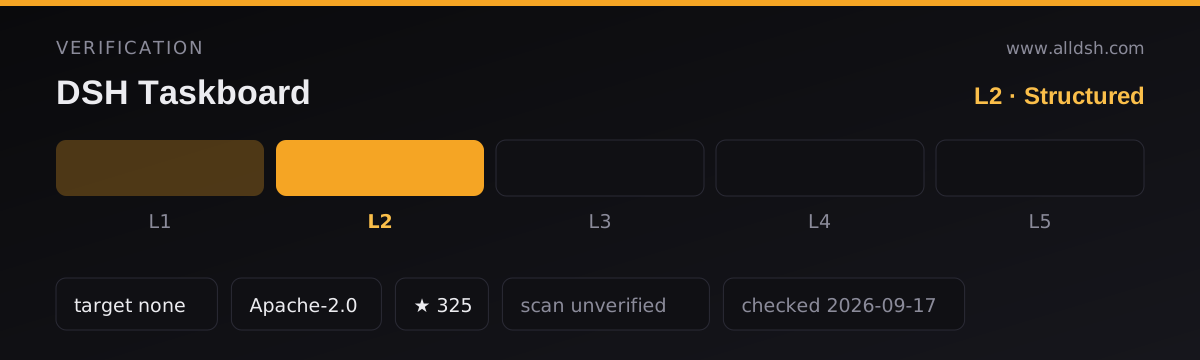
docs/security.mdis a design description, not an audit result, and the README states no security-review status.- Stars are not maintenance: 327 stars, 8 forks, and a most recent commit of 2026-08-31.
When to use it — and when not to
Use it if you want agent work to run against a durable, inspectable task list rather than a chat turn, and if you specifically want a human acceptance gate the agent cannot click past. The claim-and-version mechanism gives you a board that survives restarts, and because automation reuses ordinary Harness sessions there is no second orchestration model to learn.
Do not install it expecting it to manage your repository. It does not commit, push, merge or open pull requests, and the sessions it starts edit files in a bound workspace like any other session.
FAQ
Does an agent ever mark its own task as done?
No. The README states that agents can submit verified work to in_review and that only an authenticated human UI or CLI operation can accept it as done. It repeats the point from the other direction: goal completion never accepts a task, and agent success ends at in_review. The model-facing tool set deliberately has no accept tool and no generic status mutation tool.
How does an agent claim a task?
With taskboard_claim, passing the task_id and the exact current expected_version. Only eligible todo items can be claimed, and the service rechecks dependencies, archive state and exclusive development context in the same transaction. The plugin returns TASK_STALE_VERSION if the version moved — reread rather than retry — and orphaned claims stay visible for a human to resolve instead of being silently reassigned.
Does it work with my harness version?
That is the open question. The README declares DeepSeek Harness 0.1.2-alpha.2 as the compatible Host, and the peer dependencies pin a long list of @deepseek-ai/* packages to that exact release. Compatibility with any other release, newer included, is not stated by either source.
Is it “no second chat runtime” because it has no agent capability?
No — the opposite. It does drive agent sessions: an enabled automation claims todo work and drives a root agent session and goal, stopping at in_review. The phrase means the plugin reuses Harness’s existing session, goal, workspace and permission machinery instead of shipping a second runtime. The architecture document puts it precisely: the driver never imports agent-loop but creates or resumes a root agent through public services.
Does my data leave the machine?
Nothing documented does. The README says network access is only needed to clone the repository and install Node dependencies; the single runtime dependency is zod, and no telemetry or analytics library appears in the package or the host source. Task state is a local SQLite file and attachments are a local directory.
Can I back it up, and can I move it?
Yes. Copy the SQLite file together with its WAL files while live plus the attachment directory, stopping Harness first for a consistent offline backup. To relocate, stop Harness, move both, and point databasePath and attachmentRoot at the new locations. Watch the default relative path — set an absolute one if you want the location to be predictable.