AllDSH
中文

DSH Market

dsh-market · dsh-market/dsh-market

A visual plugin market inside DeepSeek Harness — browse a curated third-party registry and install from a card.

DSH Market is a DSH plugin by dsh-market. A visual plugin market inside DeepSeek Harness — browse a curated third-party registry and install from a card. It is filed under Development & Operations and Tools & Capabilities. Verification level L3 (Install spec), an automated security scan has not run yet, and it targets DeepSeek Harness 0.1.0-rc.6 or newer; the listing was last checked on 2026-09-18 and is published under the MIT licence. Install it with dsh plugin --profile web add dshmarket

Listing checked by Chiyu , data updated · How to cite

L3active
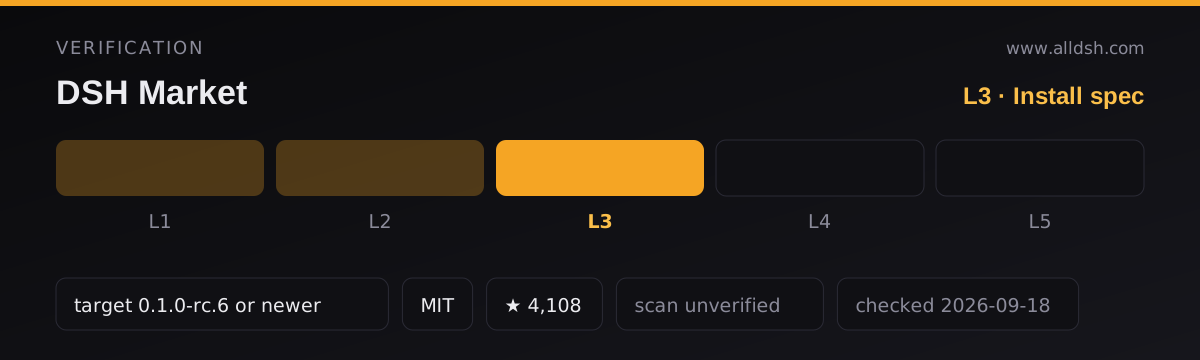
DSH Market verification panel: level L3 of 5 (Install spec) — Install command parsed, DSH target declared. Security scan: unverified — no scan has run. Compatibility target: DeepSeek Harness 0.1.0-rc.6 or newer. Licence: MIT. GitHub stars: 4,108. Listing last checked 2026-09-18.
Verification panel for DSH Market. The listing holds level L3 of 5 — Install spec: Install command parsed, DSH target declared. Security scan: unverified — no scan has run. Compatibility target: DeepSeek Harness 0.1.0-rc.6 or newer. Licence: MIT. Listing last checked 2026-09-18. How verification works

In use

Screenshots taken by this directory of the plugin running in a throwaway DeepSeek Harness on a generated demo project — not of your own machine, and not supplied by the author. Click any capture for the full-size version.

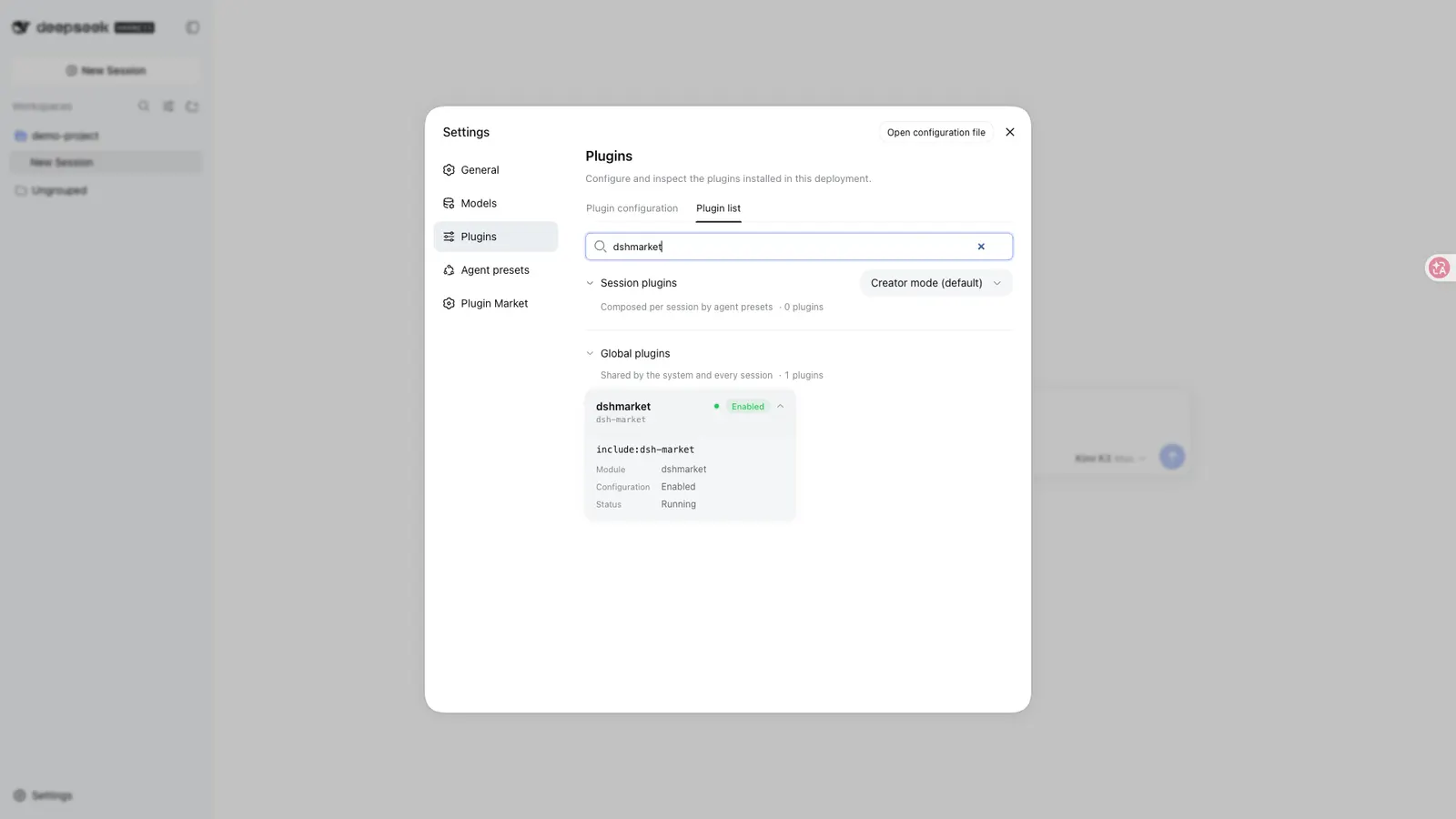
DSH Market — Installed and enabled, as the expanded row in Settings → Plugins → Plugin list: full package name, configuration state and runtime state.
Installed and enabled, as the expanded row in Settings → Plugins → Plugin list: full package name, configuration state and runtime state.
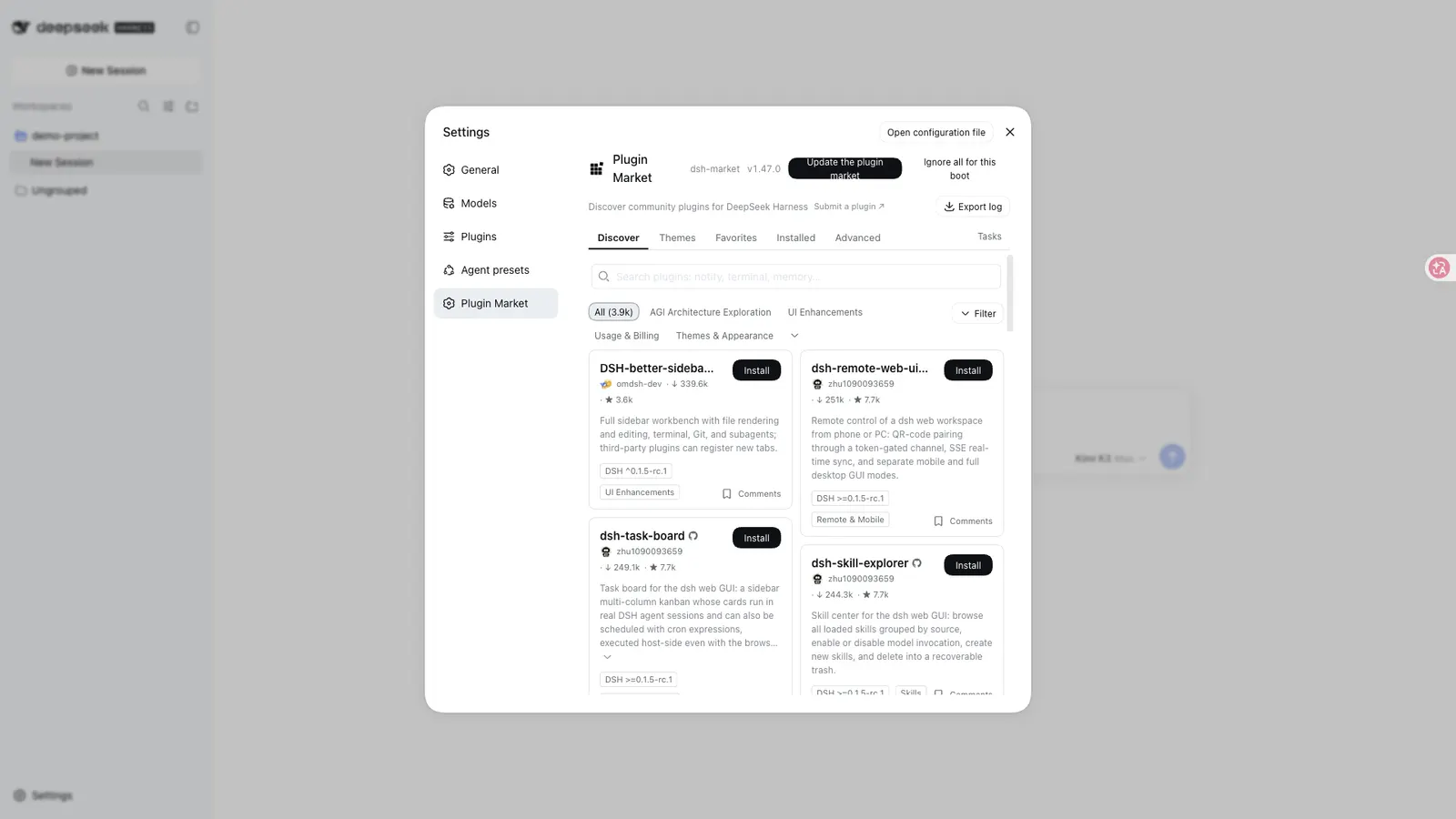
DSH Market — A settings page this plugin adds: “Plugin Market”.
A settings page this plugin adds: “Plugin Market”.

Captured by AllDSH on 2026-09-18 against DSH 0.1.5-rc.1 at a 1920×1080 viewport, package dshmarket@^1.47.0.

Install command

dsh plugin --profile web add dshmarket

Requires a running harness: start it withnpx @deepseek-ai/dsh webthen run the command above.New to this? See the installation guide.

What it does

DSH Market puts plugin discovery inside the harness. You open a settings page, browse a catalogue with categories, star counts and screenshots, and install from a card instead of copying a package name into a terminal. It is the shortest path from wondering whether a plugin exists to having it loaded.

One distinction matters more than any feature: this repository is the market app, not the catalogue. The list it shows comes from a separate curated registry, awesome-dsh-plugin, and the market fetches that list live from awesome-dsh-plugin.com/plugins.json every time you open it — there is deliberately no bundled snapshot to fall back on. So the market’s own README is careful about what a listing means: listing ≠ endorsement, and plugins remain third-party code.

What you can do in it

  • Browse and search a catalogue the README describes as “2300+ plugins, growing daily”, with category filters, star counts, top and new sorting, and bilingual descriptions.
  • One-click install, with terminal- and CLI-surface plugins flagged before you confirm.
  • Hot disable and enable — toggling writes a disabled flag into the profile’s cordis.patch.yml, and the README says the harness recomposes it within about a second, so most changes do not need a restart. A restart button exists for the cases that do.
  • Back up and restore your profile as JSON, including daily automatic WebDAV backup or a private GitHub Gist. Restores merge rather than replace.
  • Updates, triggered by you — one plugin, or everything at once.
  • Diagnostics: log export that masks home paths and credential shapes, a load-order view, and an “AI fix” path for a broken profile.

Requirements

The harness must be running a web profile at 0.1.0-rc.6 or newer; on an older host the market disables itself and says so in the browser console. pnpm is required and is auto-detected, with a one-click setup offered if it is missing. The README states no minimum Node version, operating system, or account requirement — the package’s package.json declares no engines field either.

What it does not promise

The install surface is the part to read before using it, because the market installs and runs other people’s code:

  • Installs are restricted to sources listed in the curated registry — anything else is rejected, so this is not a general URL installer.
  • Build scripts stay blocked by default under pnpm 10 and later.
  • The README states no moderation, review, malware-scanning or audit process, and no permissions field exists in the package. “Curated” describes the registry’s editorial list, not a security guarantee.
  • Backups can contain credentials from your profile configuration. The UI warns before export or upload; WebDAV is HTTPS-only, refuses private-network targets, and never stores your password in the browser.
  • The market’s README says it “never phones home”, but it also fetches the catalogue live on every open and contacts GitHub and giscus for screenshots and comments. Read that as “no first-party telemetry”, not as “no outbound network access”. Telemetry is not stated either way.

When to use it — and when not to

Use it if you want to discover plugins without leaving the harness, or if you would rather toggle a plugin off than reason about profile files by hand. The hot disable path and the backup/restore tools are genuinely useful even if you install everything by hand.

Be cautious if you are using it as a trust signal. It is a browser over a third-party registry, and the thing you are installing still deserves the source review you would give it otherwise. Also note that it manages its own dependencies through the harness’s settings API, so the self-management behaviour needs a newer harness than the plain catalogue browsing does.

Compatibility notes

The package is published as dshmarket while the repository and its patch file use the dsh-market id — worth knowing when you are matching a profile entry to a package. Settings, pnpm setup and the restart control assume a standard --profile web layout with state.json and cordis.patch.yml in the profile directory. Service-manager integration is uneven: the README hides the systemd restart button and does not detect pm2 or launchd, so a restart under those setups is manual.

FAQ

Does DSH Market review or vouch for the plugins it lists?

No. Its README states plainly that listing is not endorsement, and that plugins are third-party code. The catalogue is curated as an editorial list by a separate registry project; this repository does not run a security review, a malware scan, or an audit, and it publishes no moderation policy.

Where does the plugin list actually come from?

From a separate curated registry, fetched live on every open. The market repository holds the browsing interface, not the catalogue, and the README says a bundled snapshot was deliberately left out. If that registry is unreachable, there is no bundled snapshot to fall back on — but the README documents an escape hatch: set DSHM_REGISTRY_URL in the environment dsh runs in to any host serving the same plugins.json shape.

Does it install plugins automatically?

No. Installs and updates are user-triggered. The market also refuses sources outside the curated registry and keeps package build scripts blocked by default.

Can its backups leak my credentials?

The backup file can contain credentials from your profile configuration, and the README says the interface warns before you export or upload one. WebDAV backup is HTTPS-only, refuses private-network targets, and does not keep your password in the browser.

Sources & references

The technical claims on this page rest on the primary documents below. Each link is followed so it can be checked directly.

  1. [1]dsh-market/dsh-market — GitHubThe plugin’s own repository and README — the primary document every claim in this listing is checked against.
  2. [2]dshmarket on npm — npmThe published package the install command on this page resolves.
  3. [3]deepseek-ai/deepseek-harness — GitHubUpstream repository for DeepSeek Harness, the Cordis runtime and the plugin loading model.
  4. [4]@deepseek-ai/dsh on npm — npmPublished harness package, including the release tags our dshTarget field tracks.
  5. [5]dsh-plugin GitHub topic — GitHubThe discovery mechanism used to find plugins listed in this directory.

All links last verified 2026-09-11

Questions about this listing

Is DSH Market safe to install?
DSH Market holds verification level L3 of 5 — Install command parsed, DSH target declared — and its security status is unverified — no scan has run. A verification level records how far the install path was exercised; it is not a safety guarantee. Safety depends on what the plugin can actually reach, so read its source and install script and check its file, shell, network and credential access before you run it.
Which DeepSeek Harness version does DSH Market target?
DSH Market declares dshTarget 0.1.0-rc.6 or newer, the DeepSeek Harness release this listing was checked against. dshTarget is the compatibility target the plugin author declares: it records that a release was checked, not that the plugin keeps working after upstream ships something new. Test in an isolated profile before upgrading your harness.
How do I install DSH Market?
Start the harness with npx @deepseek-ai/dsh web, then copy the install command shown at the top of this page. That command is generated from the package name the repository publishes — or from an install spec the listing declares — so it cannot drift from what the repository actually ships. This listing was last checked on 2026-09-18.
Does DSH Market review or vouch for the plugins it lists?
No. Its README states plainly that listing is not endorsement, and that plugins are third-party code. The catalogue is curated as an editorial list by a separate registry project; this repository does not run a security review, a malware scan, or an audit, and it publishes no moderation policy.
Where does the plugin list actually come from?
From a separate curated registry, fetched live on every open. The market repository holds the browsing interface, not the catalogue, and the README says a bundled snapshot was deliberately left out. If that registry is unreachable, there is no bundled snapshot to fall back on — but the README documents an escape hatch: set DSHM_REGISTRY_URL in the environment dsh runs in to any host serving the same plugins.json shape.
Does it install plugins automatically?
No. Installs and updates are user-triggered. The market also refuses sources outside the curated registry and keeps package build scripts blocked by default.
Can its backups leak my credentials?
The backup file can contain credentials from your profile configuration, and the README says the interface warns before you export or upload one. WebDAV backup is HTTPS-only, refuses private-network targets, and does not keep your password in the browser.

Similar DSH plugins

Browse all

Modlens

liustack

Editor's pick

A vision bridge for text-only harnesses — images go out to a vision engine you configure, structured evidence comes back.

L2
4k TypeScript
Editor's pick

A sidebar platform for DSH — file, terminal, diff and agent pages, plus a service other plugins use to register their own tabs and file viewers.

L3
3.6k TypeScript

API Relay Audit

toby-bridges

A DSH plugin that runs a local 14-step audit against an AI API relay, reusing the current provider's endpoint and credential.

L3
838 Python

DSH Desktop

anywhere-labs

A modern desktop client for the DSH plugin ecosystem, where the desktop shell itself is a plugin.

L1
27.5k TypeScript

Three components, three install paths: a restart-free runtime plugin injector, routing agent presets, and a graded task protocol.

L3
7.2k JavaScript

treg

superdesigndev

A credential-injecting proxy and shared tool registry: one token reaches 3,000+ catalogued endpoints, and keys stay on the server.

L2
1.6k Python
ESC

Type to search the index. Built at deploy time by Pagefind.