AllDSH
中文

Modlens

liustack · liustack/modlens

A vision bridge for text-only harnesses — images go out to a vision engine you configure, structured evidence comes back.

Modlens is a DSH plugin by liustack. A vision bridge for text-only harnesses — images go out to a vision engine you configure, structured evidence comes back. It is filed under Tools & Capabilities and Models & Reasoning, for Vision & OCR. Verification level L2 (Structured), an automated security scan has not run yet, and it declares no specific compatibility target; the listing was last checked on 2026-09-18 and is published under the MIT licence. Install it with dsh plugin --profile web add @liustack/modlens

Listing checked by Chiyu , data updated · How to cite

L2active
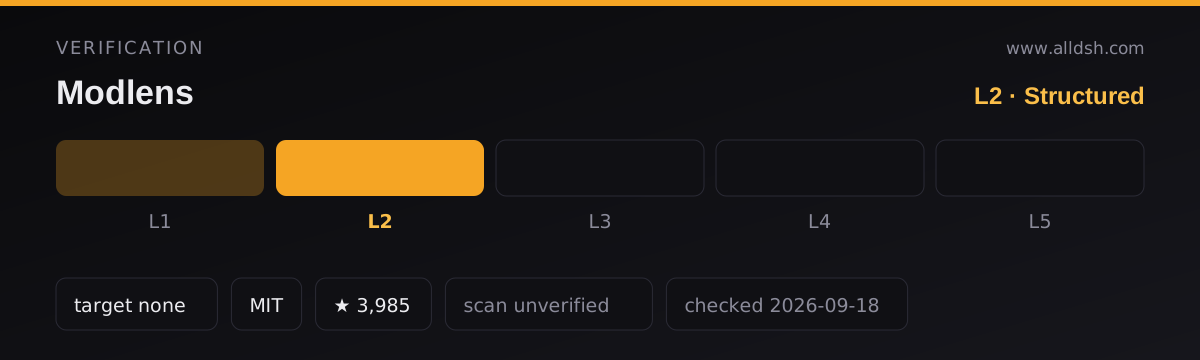
Modlens verification panel: level L2 of 5 (Structured) — Manifest valid, key fields complete. Security scan: unverified — no scan has run. Compatibility target: DeepSeek Harness not declared. Licence: MIT. GitHub stars: 3,985. Listing last checked 2026-09-18.
Verification panel for Modlens. The listing holds level L2 of 5 — Structured: Manifest valid, key fields complete. Security scan: unverified — no scan has run. Compatibility target: DeepSeek Harness not declared. Licence: MIT. Listing last checked 2026-09-18. How verification works

In use

Screenshots taken by this directory of the plugin running in a throwaway DeepSeek Harness on a generated demo project — not of your own machine, and not supplied by the author. Click any capture for the full-size version.

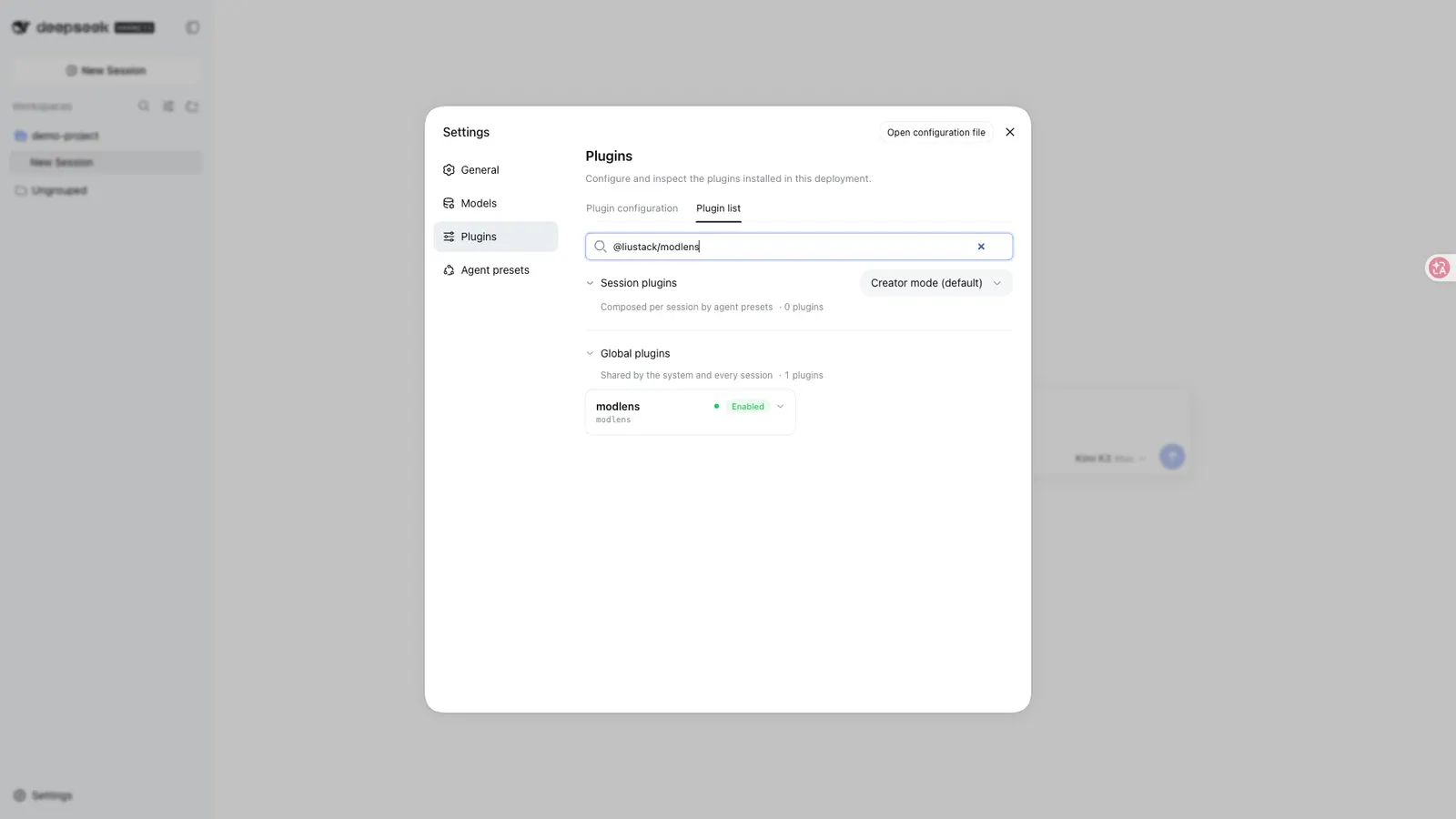
Modlens — Installed and enabled, as the expanded row in Settings → Plugins → Plugin list: full package name, configuration state and runtime state.
Installed and enabled, as the expanded row in Settings → Plugins → Plugin list: full package name, configuration state and runtime state.

Captured by AllDSH on 2026-09-19 against DSH 0.1.5-rc.1 at a 1920×1080 viewport, package @liustack/modlens@^3.26.1.

Install command

dsh plugin --profile web add @liustack/modlens

Requires a running harness: start it withnpx @deepseek-ai/dsh webthen run the command above.New to this? See the installation guide.

What it does

Modlens lets a model that cannot see work with images. It is worth being precise about how, because the obvious reading of “vision for text-only models” is wrong: Modlens does not give your harness eyes of its own. It routes the image to a vision engine you configure and pay for, then converts what that engine returns into structured evidence the text model can read — full transcription, reading-order layout regions, and entity and relation lists.

That distinction decides whether the plugin is useful to you. Nothing works until at least one vision engine is configured: either an API key, or a login from a CLI you already have. What Modlens contributes is the plumbing — routing, failover, and an output shape a text model can reason over instead of a paragraph it has to trust.

How it gets vision

Six providers ship built in, and they are not equivalent. The README gives each a what-it-needs and a speed-per-read:

Provider What it needs Speed
gemini-api a free Gemini API key (about three minutes, no card) 5–10s
openai any OpenAI-compatible endpoint — key, base URL, model 5–10s
anthropic an Anthropic API key 5–10s
antigravity-cli the agy CLI, one browser sign-in, no API key 15–45s
claude-cli a signed-in Claude Code 20–45s
kimi-cli a signed-in Kimi Code 20–45s

gemini-api is the README’s recommended default. Four more engines can be borrowed from local agent CLIs — Codex, OpenCode, Pi and Grok — but each one is behind explicit per-harness consent recorded in config, and every borrowed read is labelled in the output with whose quota it spent, so a fallback is never silent about the bill.

Left unpinned, every configured engine forms a single failover chain: the fast API providers go first, the agent CLIs back them up, the first good result wins, and the output records every attempt. A preference can be set without disabling the chain, or a single provider pinned with no fallback at all. API keys may be a comma-separated list, and Modlens rotates to the next key when one hits an authentication, rate-limit or quota failure.

Where it plugs in

In the harness, Modlens adds wrapped entries to the model selector, and a modlens_read_image tool. It inspects routes and takes over only models whose metadata positively confirms they are text-only — native vision models are excluded automatically, and anything unconfirmed is left alone. Pasted images arrive as structured evidence rather than pixels.

Requirements and cost

Node.js 22.19 or newer. The package has exactly two runtime dependencies, commander and undici, and ships its own CLI, docs and skill. Beyond that, the real requirement is an engine: at minimum one API key or one signed-in CLI. The README calls the Gemini key free and the agy route keyless, but publishes no quota numbers, rate limits or prices, and states plainly that your use of each upstream engine is governed by that provider’s own terms.

When to use it — and when not to

Use it if you work in a harness on a text-only model and you already have a vision-capable account somewhere — a Gemini key, an OpenAI-compatible gateway, or a Claude Code or Codex login you are willing to lend it. The failover chain is the strongest argument for it: you can configure several engines and let it pick, without writing routing logic yourself.

Do not install it expecting vision to be self-contained, free, or unattended. It needs an engine, the engines have quotas, and the plugin is explicit that upstream terms are yours to honour. If your harness already runs a natively multimodal model, Modlens deliberately stays out of the way.

Two honest limits from the source. Dense charts are named as the case where vision bridges most often fail. And the README publishes no accuracy benchmark, no image-size or tiling limits, and no maximum image count — so the quality ceiling is whatever your chosen engine gives you.

Compatibility notes

Only the pin matters much here: the README’s install instruction names an exact version, which is the right habit for a plugin whose output shape downstream parsing may depend on. The project is maintained by a single author who reviews every line and does not accept pull requests, so fixes arrive on the maintainer’s schedule rather than yours. It is MIT licensed and shipped as-is, with no warranty for any use including commercial.

FAQ

Do I need a vision model to use it?

No, but you do need a vision engine. Modlens works with a text-only model in the harness — that is the point — but you must configure at least one of the six built-in providers or borrow one of the four local CLIs. The harness stays text-only; the image is read elsewhere.

Does it send my images somewhere?

Yes. The image goes to whichever vision engine is configured and answering, which is typically a hosted API, and your use of that service is governed by its terms. Local CLIs you already have signed in are the alternative. The README points to its security documentation for what is fetched on remote URLs; it does not state a retention policy, and it does not describe telemetry.

What exactly comes back?

The README describes the output as full transcription, reading-order layout regions, and entity and relation lists — evidence meant to be quoted rather than summarised. The JSON contract lives in the project’s own output-schema documentation, which is the place to check field names before parsing them.

Can I use it in other harnesses?

Yes. The package also ships as a skill, and the README documents a separate skill install for other harnesses. Screen capture is not included — that is a different plugin — and web search is a sibling project rather than part of Modlens.

Sources & references

The technical claims on this page rest on the primary documents below. Each link is followed so it can be checked directly.

  1. [1]liustack/modlens — GitHubThe plugin’s own repository and README — the primary document every claim in this listing is checked against.
  2. [2]@liustack/modlens on npm — npmThe published package the install command on this page resolves.
  3. [3]deepseek-ai/deepseek-harness — GitHubUpstream repository for DeepSeek Harness, the Cordis runtime and the plugin loading model.
  4. [4]@deepseek-ai/dsh on npm — npmPublished harness package, including the release tags our dshTarget field tracks.
  5. [5]dsh-plugin GitHub topic — GitHubThe discovery mechanism used to find plugins listed in this directory.

All links last verified 2026-09-11

Questions about this listing

Is Modlens safe to install?
Modlens holds verification level L2 of 5 — Manifest valid, key fields complete — and its security status is unverified — no scan has run. A verification level records how far the install path was exercised; it is not a safety guarantee. Safety depends on what the plugin can actually reach, so read its source and install script and check its file, shell, network and credential access before you run it.
Which DeepSeek Harness version does Modlens target?
Modlens declares no dshTarget, so no specific DeepSeek Harness release has been committed to. The field is optional, and its absence means this listing makes no claim about working on a particular release — test it in an isolated profile first.
How do I install Modlens?
Start the harness with npx @deepseek-ai/dsh web, then copy the install command shown at the top of this page. That command is generated from the package name the repository publishes — or from an install spec the listing declares — so it cannot drift from what the repository actually ships. This listing was last checked on 2026-09-18.
Do I need a vision model to use it?
No, but you do need a vision engine. Modlens works with a text-only model in the harness — that is the point — but you must configure at least one of the six built-in providers or borrow one of the four local CLIs. The harness stays text-only; the image is read elsewhere.
Does it send my images somewhere?
Yes. The image goes to whichever vision engine is configured and answering, which is typically a hosted API, and your use of that service is governed by its terms. Local CLIs you already have signed in are the alternative. The README points to its security documentation for what is fetched on remote URLs; it does not state a retention policy, and it does not describe telemetry.
What exactly comes back?
The README describes the output as full transcription, reading-order layout regions, and entity and relation lists — evidence meant to be quoted rather than summarised. The JSON contract lives in the project's own output-schema documentation, which is the place to check field names before parsing them.
Can I use it in other harnesses?
Yes. The package also ships as a skill, and the README documents a separate skill install for other harnesses. Screen capture is not included — that is a different plugin — and web search is a sibling project rather than part of Modlens.

Similar DSH plugins

Browse all
Editor's pick

A sidebar platform for DSH — file, terminal, diff and agent pages, plus a service other plugins use to register their own tabs and file viewers.

L3
3.6k TypeScript

OpenBiliClaw

whiteguo233

Local-first content discovery agent that learns your interests, then hunts the open web and social platforms for you.

L1
3.3k Python

Eyes for text-only agents — an opt-in vision turn with pixel-level tools, and an anonymous keyless fallback that is not private.

L3
1.1k JavaScript

A vision toolbox for text-only models covering image QA, long screenshot OCR, UI restoration and grounding.

L3
882 TypeScript

Modsearch

liustack

Editor's pick

Free web search for DSH with no signup or key: structured JSON with citations, plus X search once Grok is installed.

L2
501 TypeScript

DSH Market

dsh-market

A visual plugin market inside DeepSeek Harness — browse a curated third-party registry and install from a card.

L3
4.1k TypeScript
ESC

Type to search the index. Built at deploy time by Pagefind.