What this plugin is
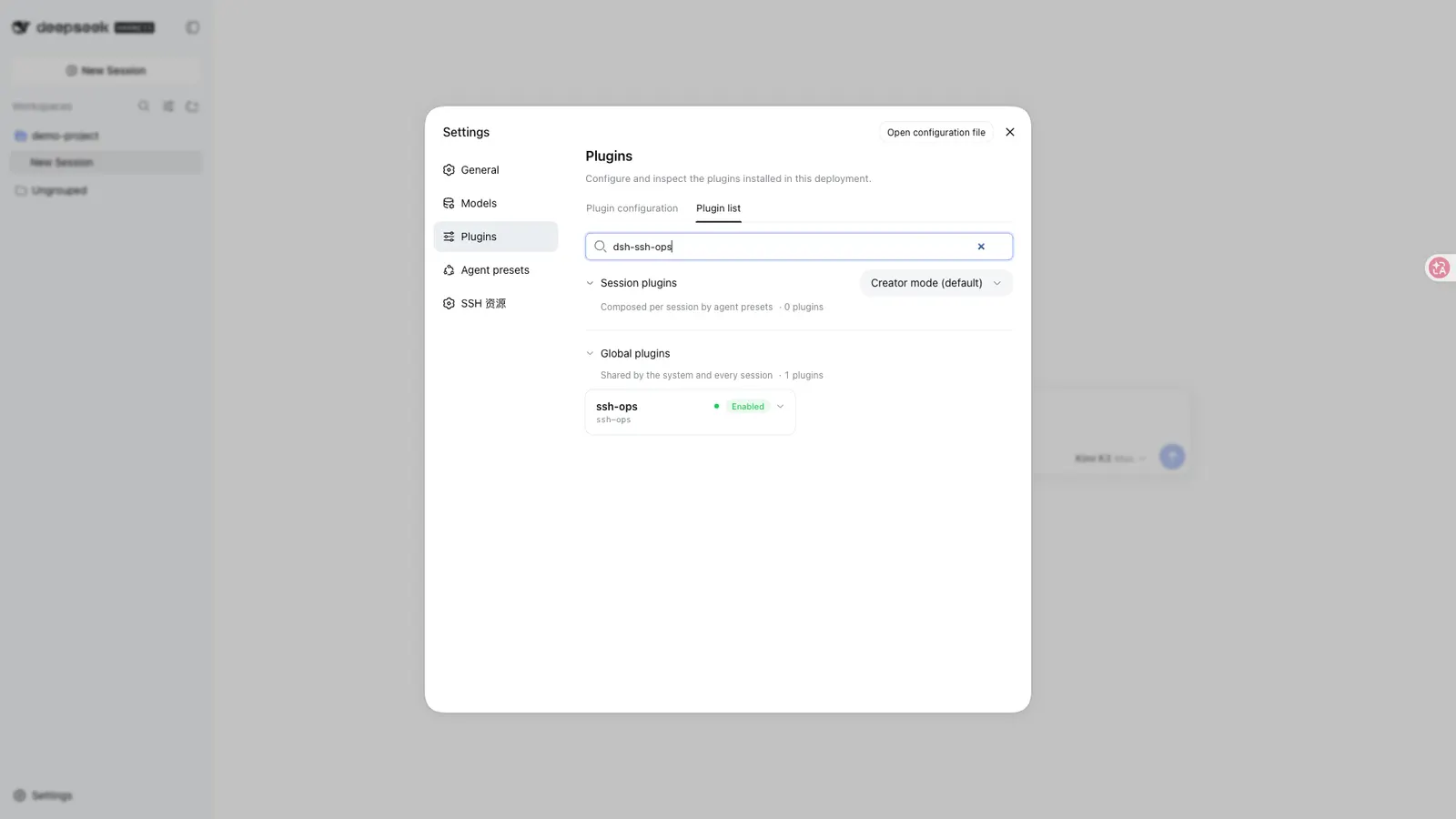
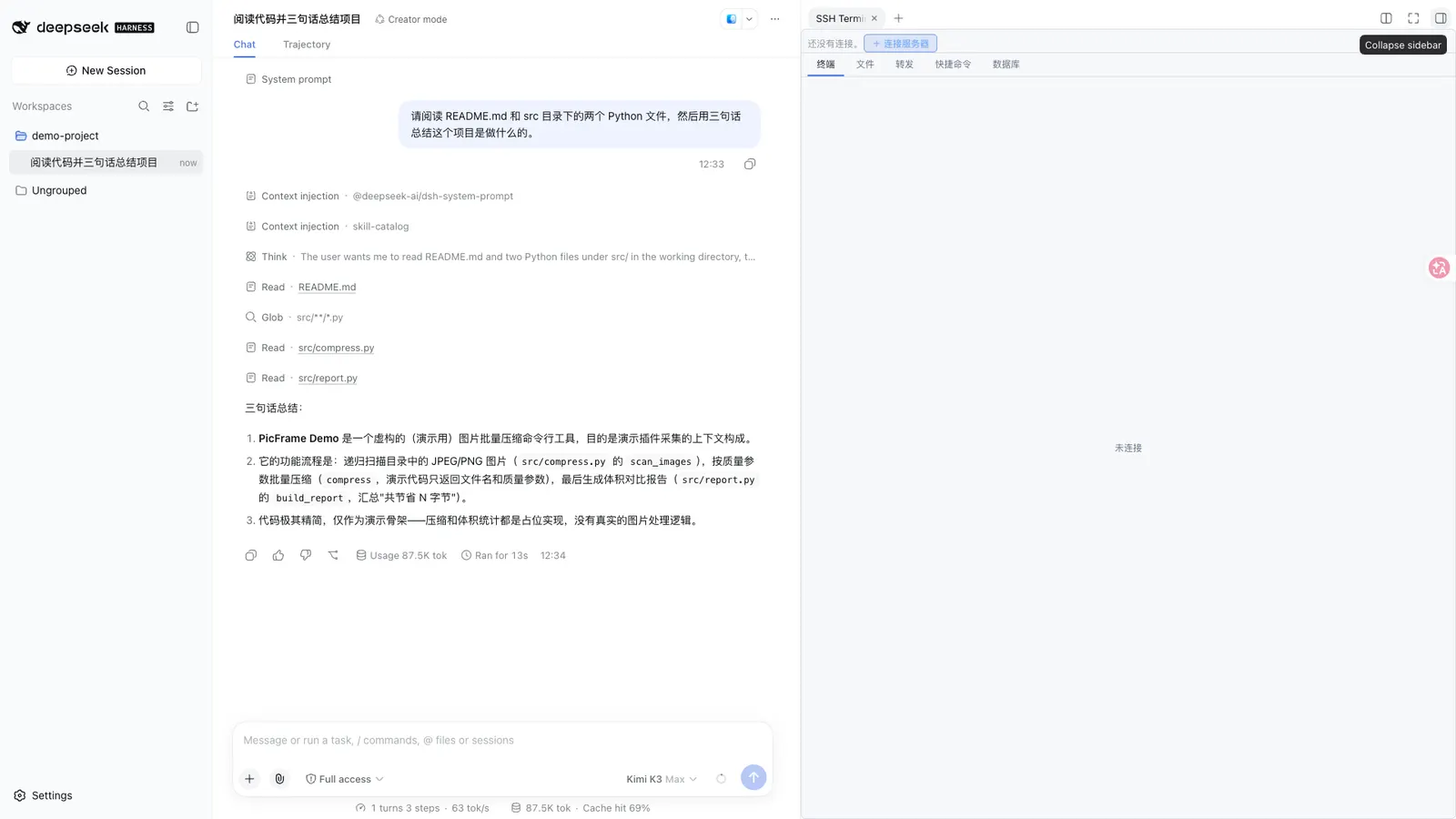
DSH SSH Ops is a DeepSeek Harness plugin that puts remote-server work inside the session. You describe the task in the main conversation; the agent runs the corresponding commands over SSH; and a real interactive terminal stays in the harness’s right sidebar next to the chat. Around that core it adds SFTP file management, port forwarding, multi-host batch execution and database access for MySQL, PostgreSQL, Redis and MongoDB.
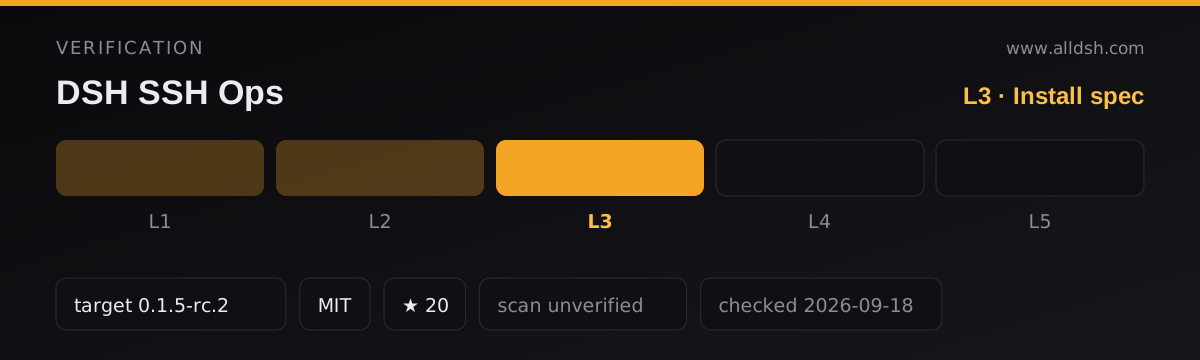
The published package is dsh-ssh-ops at version 0.3.5, under the MIT licence, published from github.com/caoyiwei850/dsh-ssh-ops. Its package.json declares main: lib/index.js plus ./typert, ./remote and ./client entry points, so the shipped artifact is prebuilt JavaScript rather than sources you compile yourself.
What the dsh field tells the harness, and what therefore gets installed:
dsh.bundle.patchpoints at./cordis.patch.yml, so installing the package also applies that composition patch to your profile. The package’sfileslist shipslib,scripts,cordis.patch.yml,INSTALL.mdandLICENSE.dsh.clientdeclaresplatform: "web"and injects@deepseek-ai/dsh-client-runtime— the terminal and database panel are browser-rendered client code.- The package’s runtime dependencies are
ssh2,mysql2,pg,pg-cursor,redis,mongodbandzod. The README additionally says a newer DSH installs the client terminal through@xterm/xterm;@xterm/xtermand@xterm/addon-fitare listed as devDependencies in the published manifest, not as runtime dependencies, and the README does not explain that difference.
What it actually does
The README describes a single panel with tabs — a terminal, a file browser, a forwarding tab and a database tab — plus 29 agent tools grouped as SSH (6), SFTP (6), tunnels (3), batch (1) and database (14). Tools that accept connection_id / db_connection_id act on the current active connection when you omit it, so the agent does not have to call ssh_list or db_list_connections first.
- Command execution.
ssh_execruns an agent command on the current server and returns exit code, output,cwd, duration, timeout and truncation state. The README says it inherits the interactive shell’s real directory when a single idle POSIX interactive shell can be uniquely confirmed, and refuses to run when the terminal is busy, the candidate is ambiguous, or the directory is unreachable. - Terminal reading and writing.
ssh_readreads the side terminal’s buffered output on demand, so manual terminal content is not silently pushed into the conversation.ssh_writesends interactive input to a terminal, withpress_enterdefaulting to true. - File transfer. SFTP list, read (4 MiB default cap), write, mkdir, rename and delete, from the panel or via tools.
- Port forwarding. Local (your machine to something the server can reach) and remote (server to your machine) tunnels, established, listed and stopped from the panel or via
tunnel_*tools. - Multi-host execution.
ssh_batchbuilds a batch task from servers saved in SSH resources — including ones that are not currently connected. The panel then shows a checklist and the operator confirms; execution is concurrent per host, each using saved credentials, and results are grouped per server. The README states the olderssh_cluster, which fanned out over already-open connections without confirmation, was removed entirely. - Databases. Connect to MySQL, PostgreSQL, Redis and MongoDB; loopback database addresses are tunnelled automatically through the current SSH server unless disabled.
db_queryis a lexical read-only gate on MySQL/PostgreSQL,db_executehandles writes,db_runcovers Redis commands and MongoDB operations, and there is an interactive transaction workflow with a five-minute idle auto-rollback.
The side terminal is a real PTY
The README describes a real interactive terminal, not a log view: “并自动创建右侧 PTY 终端” — connecting a saved resource creates a PTY terminal on the right. It renders through xterm on its own canvas, ships both light and dark palettes because it cannot inherit CSS text colour, and repaints already-open terminals on a theme switch. Connection lifetime is separated from tab visibility: switching tabs, collapsing the sidebar, closing the tab or switching chats does not disconnect SSH; terminal instances stay in a host-side memory pool and reopening restores full scrollback, with server output buffered by the host in the meantime.
Human output and agent commands meet in one place — agent commands appear in that terminal — but the README does not present the terminal as an agent input channel. It describes the opposite flow: the agent reads the terminal with ssh_read on demand rather than having manual terminal content pushed into the conversation silently. Whether a person typing into the terminal can influence an agent’s next command is not addressed; the source does note that ssh_exec refuses to run when the terminal is busy.
The security model, read exactly
This is the part worth reading carefully on a tool that runs commands on other people’s machines. Protection here is not a dry-run and not a diff of a plan. It is a blacklist plus an operator confirmation queue.
The README’s own words: “DSH 自身权限机制仍然有效。本插件额外阻止 Agent 工具执行明显不可逆或破坏性操作,例如删除文件、删库、格式化磁盘、terraform destroy、kubectl delete、docker prune、强制 Git 清理以及重启/关机。” DSH’s own permission mechanism stays in force; the plugin adds a block on operations it judges clearly irreversible or destructive — deleting files, dropping databases, formatting disks, terraform destroy, kubectl delete, docker prune, forced Git cleanup, and reboot/shutdown.
What happens on a hit is stated in detail: a one-shot pending record is created and a confirmation modal appears across the whole viewport with the full command, the reason it was flagged, and 执行 / 撤销 buttons. Unhandled items also live above the terminal in the right-side SSH panel as collapsed cards. “只有操作者点击红色「执行」才会将命令发送到服务器(自动追加回车)” — only the operator clicking Execute sends the command. Dangerous commands are deliberately not pre-filled into the terminal input line, so a stray Enter cannot run one. If there is no live terminal session at that moment, or the command contains control characters that cannot be sent safely to a PTY, the plugin degrades to returning a copyable command card in the conversation for the operator to paste.
The same mechanism covers three surfaces: shell commands from ssh_exec, sftp_delete (which no longer deletes directly, but queues an equivalent rm -rf <path>), and high-risk SQL from db_execute (DROP/TRUNCATE/SHUTDOWN, returned as a SQL code-block card for the operator to run in the database panel). The README says SQL classification works on the statement verb, skips string literals and comments, supports multiple statements split on ;, and does not kill keywords inside string literals. Ordinary operations — configuring SSL, installing packages, editing configuration, reloading services — pass through DSH’s normal permission flow.
Three things the README does not say, and which a reader should not assume:
- Who decides. The README says the plugin blocks what it judges destructive, and lists examples, but publishes no actual pattern list and no rule for editing it.
- Whether it can be turned off. No configuration switch, threshold, or bypass is documented for the guard. That is the absence of a documented disable path, not a claim that a bypass is impossible. Worth noting in the same breath: the plugin also registers
ssh_write, a tool that writes interactive input to a terminal, and the README’s security section does not say whether that path passes through the same confirmation queue. - Whether anything else gates commands. Beyond the blacklist, the README does not describe a per-command allow-list, a mandatory approval for ordinary commands, or an approval-before-the-fact for every command. “Protection” here means the destructive subset, not all traffic.
Credentials: what is stored, where, and in what form
Authentication supports passwords, PEM private keys and key passphrases, and the README is specific about storage: “密码、PEM 私钥和私钥口令仅保存到 DSH 官方本机凭据库 ~/.dsh/.credentials.yaml(owner-only 权限);浏览器存储、Agent 上下文、工具结果和资源列表均不会读取或显示秘密内容。”
So secrets for saved resources live in the harness’s own local credential store at ~/.dsh/.credentials.yaml, in a file restricted to its owner. The README states the restrictions on exposure — browser storage, agent context, tool results and resource lists do not read or display secret contents — and database profile passwords are described as stored encrypted in the DSH credential store.
Two claims must not be stretched further than the source. The README vouches for the store being official and for the file being owner-only; it does not name a cipher, a key derivation, or a master key location, and it does not say the file is encrypted beyond calling the database password storage “encrypted”. And the agent’s reach is bounded by the same text: “主 Agent 只能操作当前活动连接,不能枚举保存资源、读取凭据或自动用保存凭据连接” — the main agent can only operate the current active connection and cannot enumerate saved resources, read credentials, or connect automatically with saved credentials.
Shared credentials change the picture in one direction worth understanding. One password or private key can be saved as a shared credential and referenced by many servers and jumps, and the ciphertext is decrypted on the host side only and handed to the SSH client; the README says it does not enter browser storage or agent context. Deleting a shared credential is refused while a server or jump chain still references it.
The real leak path the README documents is not the store, it is the shortcut: “凭据使用建议:ssh_connect / db_connect 以明文参数接收密码或私钥时,这些参数会进入对话与工具调用记录。生产环境请优先把服务器保存为「SSH 资源」…避免在对话中直接传递密钥。” Passing a password or private key as a plaintext parameter to ssh_connect or db_connect puts it into the conversation and the tool-call record. The README’s own remedy is to save servers as SSH resources, or to use key-file passphrase authentication instead.
Requirements
- Node version: not stated. The published
package.jsoncontains noenginesfield, and the README names no minimum Node release. Treat any number you have seen elsewhere as unverified. - Harness floor. The README names its target host as the DSH
0.1.5series and says the project is developed against0.1.5-rc.2; that is what the listing records verbatim asdshTarget. The README’s newest integration — SSH as a tab in the official right sidebar — needs a DSH withsidebarRightTabs. On an older DSH the plugin automatically falls back to a floating panel and, per the README, behaves the same way. - Profile. Endpoint is DSH Web:
dsh.client.platformis"web", and the README’s install steps end in restarting the web interface. - System binaries. None are documented. The SSH stack is
ssh2from npm and the terminal is@xterm/xterm, so the runtime pieces are package dependencies rather than system tools. - Host configuration. Saved servers, groups, jump hosts (ProxyJump, at most 8 hops, chosen from saved servers rather than typed in) and host-key verification mode are configured in Settings → SSH Resources. Each saved server may optionally carry an absolute path as its default project directory; relative paths and control characters are rejected there. Nothing else is documented as required on the remote side beyond an SSH server you can authenticate to.
Known limits and failure modes
- The guard only covers the destructive subset. No pattern list covers every destructive command. The README’s list is examples; it is not a completeness claim, and the plugin’s protection is genuinely enforced only for what the pattern list recognises.
- Reconnection. Keepalive runs at 20 seconds with 3 strikes; after an unexpected transport drop the client reconnects with exponential backoff capped at 30 seconds; a command interrupted mid-flight is retried once transparently; transient connect failures retry 3 times, authentication failures excepted; explicit disconnects and plugin unload do not trigger reconnection; tunnels are re-registered after a reconnect.
- Host-key verification. Trust on first use by default (
accept-new), withverifyandoffavailable per server. On a fingerprint change the plugin does not retry and does not auto-reconnect — you are told to reset with “forget fingerprint”. Verification happens before user authentication. - Output handling. The README says the plugin masks private keys, bearer tokens, common passwords and API keys (including bare
sk-values) and database connection passwords before output reaches the model. Agent command output is shown in the side terminal and returned with exit code,cwd, duration, timeout and truncation state. - Trust boundary. The plugin runs commands on remote hosts with the credentials you give it. The README does not claim the guard is exhaustive and does not claim the setup is safe for a production fleet; the listing’s
security: unverifiedfield means exactly that, and this directory runs no automated security scan. - Batching.
ssh_batchtargets are chosen by the operator from saved servers and have nothing to do with the currently open connection. The README states multi-host operations have no unconfirmed path now thatssh_clusteris gone. - Banner workaround. When a peer’s SSH banner does not conform to RFC 4253 (for example
SSH-2.0- OpenSSHwith an extra space, orSSH-2.1-), the plugin retries once afterssh2rejects it and normalises the line before the handshake, preserving the peer’s software version; genuinely unusable banners are reported with the peer’s original text and are not retried.
When to use it — and when not to
Use it when the work is ordinary, repeatable server operations driven from chat: reading logs, checking memory or disk, editing configuration, configuring TLS, reloading a service, moving files, opening a tunnel to an internal service, or inspecting a database on a host you have to reach through a jump host. The SSH resource store, the shared credentials, the jump-host chain and the project-directory shortcut are the parts that make repeat visits cheap, and the separate confirmation queue is a genuine improvement over a tool that simply runs whatever the model emits.
Do not treat it as a safety net for a fleet. Three concrete grounds from the source itself: the blacklist covers clearly destructive examples rather than every destructive command; the README never claims it is production-fleet-safe; and the largest documented credential risk — passing a plaintext key or password to ssh_connect or db_connect — is a behaviour the README asks you to avoid rather than one the plugin prevents. If you cannot watch the confirmation queue, the guard degrades to a copyable card in the conversation, which means the decision moves back to you with less context. Also be careful with ssh_batch: it fans commands out to many saved hosts at once, and if you would not type that command against every one of them by hand, do not confirm it.
What the source does not state
Worth naming so it is not read as a promise:
- No star count, download count or adoption figure appears in the README or the package manifest. The
starsandforksvalues in this listing’s frontmatter come from this directory’s own data, not from the plugin’s sources. - No security audit, no review, no threat model, no CVE history and no reporting process is documented.
- No claim that the guard cannot be bypassed, and no claim that it covers all destructive commands — only the examples quoted above.
- No statement that secrets are encrypted as a scheme: the file is described as owner-only, and only database password storage is called encrypted.
- No Node version, no supported operating systems, no remote-side prerequisites beyond an SSH server, and no performance or scale figures.
- No statement about what a human typing into the terminal can or cannot influence in the agent’s execution path beyond the busy-terminal refusal already quoted.
FAQ
Is the dangerous-command protection a blocklist, a prompt, or something stronger?
A blocklist plus an operator confirmation. The README says the plugin blocks clearly irreversible or destructive operations, queues them as a one-shot pending record, and shows a modal with the full command and an 执行 / 撤销 pair. Nothing is sent until the operator clicks Execute. It is not a dry-run, and the plugin does not preview a plan for ordinary commands.
Can I turn the guard off, or bypass it?
The README documents no configuration switch, threshold or bypass for it, and publishes no pattern list to edit. It also does not state that the guard cannot be bypassed — so read the silence as “not documented” rather than “impossible”, and keep your own approval habits for production hosts.
Are my SSH passwords and private keys encrypted?
The README says passwords, PEM private keys and key passphrases are saved only to the harness’s local credential store at ~/.dsh/.credentials.yaml with owner-only permissions, and that database password storage is encrypted. It does not name a cipher or key-management scheme, so “owner-only file in the official store” is the accurate description, not “encrypted at rest” in general.
Can the agent read my credentials or enumerate my saved servers?
The README says the main agent can only operate the current active connection and cannot enumerate saved resources, read credentials, or connect automatically using saved ones. The documented leak is different: when you pass a password or private key as a plaintext parameter to ssh_connect or db_connect, that value enters the conversation and the tool-call record.
Does the agent see everything I type into the terminal?
Not automatically. The README says terminal output is read on demand with ssh_read and that manual terminal content is not silently pushed into the conversation context. Separately, output handed to the model is masked for private keys, bearer tokens, common passwords and API keys, and database connection passwords.