What it does
dsh-notification is the smallest possible answer to “tell me when the agent is done”. When a session finishes a turn in the DeepSeek Harness web GUI, the browser raises a system notification through the standard Notification API. You switch to another tab, or another application, and the completion still reaches you.
It is deliberately not a bridge. There is no bot to register, no token to paste, no webhook to expose and no second runtime — the README’s entire install story is one command and a server restart. The plugin splits into two halves that respect the harness seams:
- the host folds a bounded projection over each session’s last completed turn — its reason, its reply text, its tool names — and delivers it through the session-projection seam;
- the client watches the session list’s completion reminder, applies its own persisted preferences, and shows the notification.
Nothing is written back to the session log, and no model-facing tool is registered. That is the design rather than a shortcoming: the notification observes a state the runtime had already computed.
What the model sees: nothing
The README publishes a “Model experience” table, which is unusual, and it is worth reading as the plugin’s central claim:
| Aspect | Effect |
|---|---|
| Token cost | None — notifications are UI-only and never enter a request. |
| Tool calls | None — the model gets no new tool. |
| Session log | Unchanged — the projection reads the existing log and adds no events. |
| Prompt | Unchanged — no system-prompt section is registered. |
For a plugin whose job is to interrupt you, that table is the interesting part. A notifier that registered a tool would put a decision in front of the model on every turn (“should I notify?”); one that appended events would change the transcript you read later. This one does neither, so it composes with whatever else is installed without changing what the agent does.
What actually gates a notification
Four gates sit between a finished turn and a notification, and every default is the quiet one:
- Browser permission. Granted from the settings section, which also fires a test notification. A denied site permission cannot be overridden from inside the page.
- Outcome.
completedanderrorare on;aborted,blockedandtoken limitare off until you enable them. - Keyword rules. Optional include/exclude filters matched against the session title, the turn’s reply text and its tool names — literal or regex, with an optional case-sensitive flag. At least one include rule must match; any exclude match suppresses.
- Visibility. “Only notify when the task is out of view” is on by default, and the README is precise about what that means: a completion still notifies while the page is hidden, or while a different session or workspace is open. It suppresses only the session you are currently watching.
Preferences live in the browser’s localStorage, not in the profile — so they are per-browser, and they do not travel with your cordis.yml.
The npm name belongs to a different project
Read this before you install. The package name dsh-notification on npm is owned by another author — nishit130/dsh-notification, latest 0.1.1, first published 2026-08-21, a separate project with a similar purpose. The omdsh-dev project in this listing is at 0.1.4 and is not published under that name, which is exactly why its README documents a release-tarball install instead of dsh plugin add dsh-notification.
So do not shorten the command. Install the tarball URL as written, or you will get a different plugin from a different author. pnpm check:packages enforces the same rule from this directory’s side: it cross-checks every package: name against the repository that owns it on the npm registry, which is why this listing declares install: and no package: at all.
Requirements and install
-
From the release tarball — the only channel the author publishes:
dsh plugin --profile web add https://github.com/omdsh-dev/dsh-notification/archive/refs/tags/v0.1.4.tar.gz -
Restart the web server afterwards. Both halves have to pick the plugin up: the host contributes the projection, and the served client bundle carries the UI. The default
dsh webprofile already has the composition this needs — the session list, the settings shell and locale. -
Settings > Notifications is where the section appears once the plugin is loaded.
-
Node. The package declares no
enginesfield at all, and all ten of its harness peer dependencies plusreact@^18.2.0are marked optional. That is a real signal, and it is the reason this listing is L2 rather than L3 — see below.
Why this listing is L2, not L3
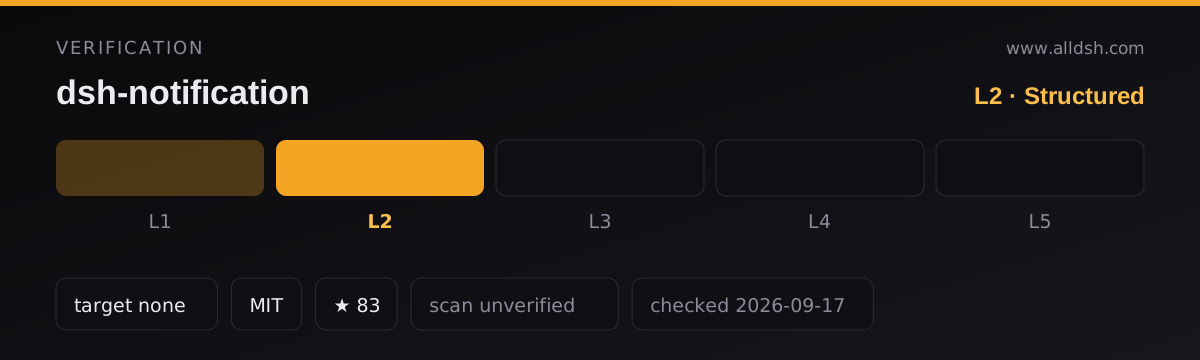
The README says version 0.1.4 “supports both the 0.1.1 and 0.1.2 Harness client package layouts and projection contracts”. Read that precisely: it is a statement that the plugin tolerates two shapes of the client package, not a declared range of harness releases. The manifest agrees — there is no dsh.compatibility block, and every peer dependency is *.
So this listing records no dshTarget. Elsewhere in this directory a declared range is what earns L3; here the author declares tolerance rather than a range, and rewriting “0.1.1 and 0.1.2 layouts” into 0.1.1 || 0.1.2 would assert a release range nobody stated. If a future release declares one, this listing should be re-verified and promoted.
Configuration
One host-side tunable, on the plugin row in cordis.yml:
| Key | Default | Meaning |
|---|---|---|
maxBodyChars |
400 |
Projection body budget; longer replies are ellipsized host-side |
Everything else is a client setting, under Settings > Notifications:
| Setting | Default | Effect |
|---|---|---|
| Enable notifications | on | Master switch; off stops every notification while keeping the rules |
| Notify on completed / error / aborted / blocked / token limit | completed + error on, rest off | Which turn-end reasons notify |
| Keyword rules | none | Include/exclude filters over the session title, the turn’s reply text and its tool names |
| Require manual dismiss | off | The notification stays until you dismiss it |
| Only notify when the task is out of view | on | Suppresses only the session you are currently watching |
Known limits
- The page has to be open. The browser shows notifications while the tab is hidden, but not after it is closed. Notification permission must also be granted, and a denial cannot be undone from inside the page.
- No catch-up. A completion that happened while the page was disconnected is not re-notified on reconnect, and a completion fires once per finished turn.
- Rules only see the last turn. The subject is the session title plus the last turn’s reply text and tool names; earlier turns are not matched, so a keyword that appears three turns ago will not trigger anything.
- The notification body is a flat text snippet, and clicking it only focuses the window — there is no deep link to the turn.
dsh-notificationis the wrong name to install by. The npm package under that name belongs to another repository; see above. Use the tarball URL.- The name space is crowded, and this is one of only two entries above 50 stars. In the nightly index, 144 repositories carry “notif” in their name; 119 of them sit at 0–2 stars, 25 reach 3 or more, and exactly two pass 50 — this one and
dsh-notifier. Check that you installed the one you meant. - Stars (83) are attention, not review. This listing records
security: unverified; no third-party scan or independent audit is on record, and no listing on this site claims L4 or L5.
When to use it — and when not to
Use it when the machine running the harness is the machine you are looking at, and you want the cheapest possible interruption: nothing to configure, no credential to leak, nothing added to the model’s context, and no transcript change. For a single-user laptop profile it is the smallest thing that solves the problem, which is why it is the right entry point for this hub rather than a substitute for the heavier options.
Reach for a different shape when the browser is not where you are. dsh-notifier pushes to 27 channels including phone push services and carries approvals, questions and a stop button back from the phone — the right tool once you leave the desk, at the cost of credentials and a much larger surface. dsh-im goes further and makes a chat window the interface, so you can hold a conversation with the session rather than only answer it; that is a bigger commitment, and its own listing is explicit that connecting a group-capable channel makes its access page required configuration.
FAQ
Does it need any change to the harness?
No. The host contributes a session projection over the log it already keeps, and the client half rides the session list’s existing completion reminder. The README states the projection reads the existing log and adds no events.
Will I be notified if I close the tab?
No. The browser can show a notification while the page is hidden, but not once it is closed. If “notified with the browser shut” is the requirement, that is a push plugin, not this one.
Can the model send a notification on purpose?
No. No tool is registered and no prompt section is added, so the model has no way to trigger one — and no way to be asked whether to. Notifications are purely a client reaction to turn-end state.
Which completions notify by default?
completed and error. aborted, blocked and token limit are available toggles but start off, which is a sensible reading of which of those actually deserve an interruption.
Why does the install use a tarball URL instead of a package name?
Because the npm name is taken by a different project. See “The npm name belongs to a different project” above; installing by name would fetch someone else’s plugin.