What it does
dsh-worktable turns the DSH web client into a project workspace. Instead of one conversation pane, you get a sidebar drawer of projects, dockable split layouts with real panes inside them, and a pinned control room that watches what every project is doing.
The README’s architecture table is unusually specific about what the plugin does and does not touch, and it is the reason this listing is comfortable with a plugin that rewrites the web shell:
| Plugin type | Cordis plugin — host routes + web client, pure additive (no official plugin replaced) |
| Workspace engine | Self-built split engine rendered into the host shell overlay seat |
| Chat pane | Reuses the host conversation — the plugin only selects sessions (sessions.open) |
| Status data | Mirror of the host session runtime snapshots (subscription-driven) |
| State | localStorage only (dsh.worktable.*); no workspace files touched |
| UI | TypeScript + React (host externals) + vanilla CSS, dark-first with light theme |
The published manifest backs the “additive” claim: dependencies is empty, and the only peer dependencies are three host packages (@deepseek-ai/cordis, @deepseek-ai/dsh-client-locale, @deepseek-ai/dsh-host-webserver). It declares both halves — dsh.bundle.patch and dsh.client.platform: web — and there are no install-time lifecycle scripts.
The three surfaces
Sidebar app drawer. Your self-hosted projects (plus resident plugins like dsh-travelatlas) collected in one list. Each entry takes a rename, an icon, an order and a visibility flag, and gets its own folder. The distinctive part is project ↔ conversation binding: opening a project switches the chat pane to the conversation bound to it, so a project is not just a folder but a session with state. Collapse the sidebar and every project becomes an icon-only tile.
Dockable split workspace. Declarative layout presets — left column, top row, main grid plus a right chat pane — with draggable dividers, per-pane tabs and per-layout width persistence. Built-in panes are file explorer, terminal, browser, animation site, and a custom window: you send a requirement to a new or existing conversation, the agent builds it, and the result auto-mounts into the pane and locks.
Control room. A pinned, undeletable first project. Bind one management conversation on first open and you get a three-column card grid mirroring every project as working / needs you / done, with live runtime, subagent counts and a cleaned message preview. The README is explicit that this is event-driven host snapshot mirroring — zero polling, zero tokens — which is the detail that separates it from a dashboard that quietly costs you money.
Requirements and install
-
Node
>=22. -
A DSH release inside the declared range
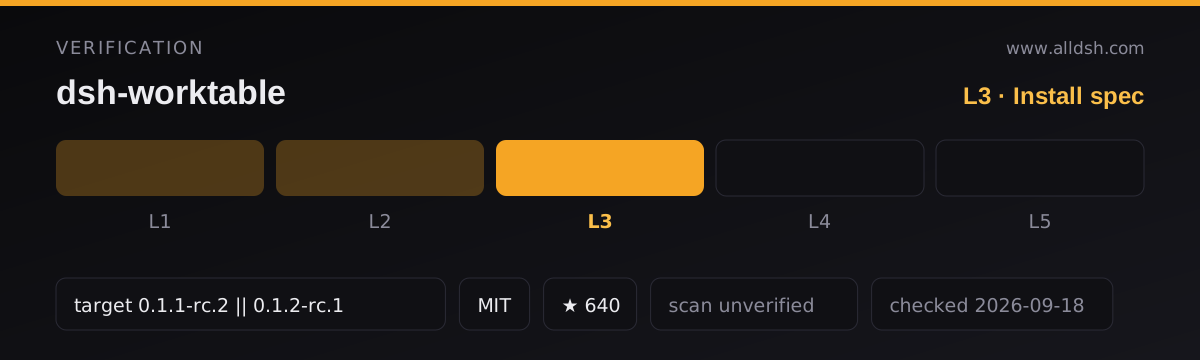
0.1.1-rc.2 || 0.1.2-rc.1. The manifest’sdsh.compatibilitycarries the same string and adshReleasesmap marking bothcompatible, which is what makes this listing L3. -
Install from the release tarball — the package is not on npm:
dsh plugin --profile web add "https://github.com/Aisland-SJL/dsh-worktable/releases/latest/download/dsh-worktable.tgz"The README notes the command registers
dsh-worktablein the profile bundle list, writes to~/.dsh, and may ask for authorization. Installing from a clone is also supported, pointed at the01_contentsubdirectory rather than the repository root:dsh plugin --profile web add "link:/absolute/path/to/dsh-worktable/01_content" -
No install-time lifecycle scripts — the manifest’s scripts are
build,check,pack,test:gateandverify:remote, none of which npm runs on install. -
Windows is the tested platform. macOS is called out as experimental; see the limits below.
Network and data
No telemetry, and no network calls beyond the host APIs and the plugin’s own routes. All user state — projects, bindings, views — stays in localStorage. The README states no workspace files are touched.
One optional outbound call. An update check performs a read-only GET to the GitHub Releases API, at most once a day, plus a manual “Check now” button. Nothing is uploaded and it can be disabled in Settings.
The consequence of localStorage state is worth stating plainly: projects and bindings do not sync across machines, and clearing site data clears them.
This listing is security: unverified; no third-party scan or independent audit is on record.
Known limits
- Windows is fully tested; macOS is experimental. The README says the core file-path code was adapted for cross-platform use but no end-to-end test has been completed on macOS hardware. Treat macOS as unverified.
- State is browser-local. Projects, bindings and views live in
localStorageand do not sync across machines or survive a site-data wipe. - The terminal pane is a plain PowerShell host on Windows — the README is explicit that it is not at PTY feature parity with the native terminal app.
- Auto-mount depends on the agent. The custom-window pane only picks up a result when the agent actually writes
widget-result.jsoninto the project folder. - The control room only watches bound projects. Unbound projects show as idle, so the grid is only as complete as your bindings.
- The install is a tarball URL, not an npm package. There is no registry version to resolve, and no
npm auditsurface — you are trusting the release asset. - Stars (623) are attention, not review. No listing on this site claims L4 or L5, and this one does not claim a smoke-tested install.
When to use it — and when not to
Use it if you run several DSH projects in parallel and keep losing track of which conversation belongs to which folder. The binding between project and conversation, and a control room that shows what needs you without polling, are the two things this does that a plain sidebar does not.
Do not install it expecting a portable workspace. The state is in one browser’s localStorage, so a second machine starts empty, and if you are on macOS the README’s own testing note applies to you. If what you actually want is more pages in the sidebar — file, terminal, diff, agent — rather than docked multi-pane project windows, better-sidebar covers that ground and is a lighter thing to adopt; the two overlap on the file and terminal panes, and differ in that this plugin is organised around projects and layouts rather than tabs.
FAQ
Does it replace or patch official DSH UI?
No. The README describes it as a pure additive Cordis plugin: it registers host routes and a web client, renders its split engine into the host shell’s overlay seat, and reuses the host conversation rather than reimplementing one. The published manifest has an empty dependencies block and only host packages as peers.
Does the control room cost tokens?
No. It mirrors host session runtime snapshots through a subscription, and the README states this is zero-polling and zero-token. It does not ask the model anything to render the grid.
Where is my data stored?
In the browser’s localStorage under dsh.worktable.*. No workspace files are modified, nothing is uploaded, and no telemetry is documented. The trade-off is that nothing syncs between machines.
Can I use it on macOS?
The README lists Windows as the fully tested platform and macOS as experimental — the path code was adapted but no end-to-end test was completed on macOS hardware. It may work; it is not verified.
Is the install safe to run?
It adds a tarball from the project’s GitHub Releases into your web profile and writes to ~/.dsh. The manifest declares no install-time lifecycle scripts, which removes the most common install-time execution risk, but a tarball is not an audited registry package — this listing records security: unverified for exactly that reason.