What it does
dsh-tianshu-tui is a terminal front end for the Harness, and the README’s most load-bearing sentence about it is an architectural one: the TUI registers no prompt, no tool and no context surface of its own. Every piece of state it draws is derived from the session event stream, and what you type becomes an ordinary logged message. That is why it can offer a very large interface without changing what the model sees — and it is also the reason the plugin is safe to treat as a view layer rather than as an agent rewrite.
The rendering core is a hand-written minimal ANSI engine, evolved from the author’s earlier Tianshu-Tui project (Apache-2.0, with per-file provenance in SOURCE-MAP.md and NOTICE).
| Area | What the README documents |
|---|---|
| Sessions | /session new|list|switch, /fork, /branch, /rewind (transcript truncation plus optional file rollback), /export to Markdown, /clear |
| Input | Fuzzy-prefix slash menu with MRU ordering and ghost preview, @-path completion and @mention expansion, bracketed paste, optional vim keymaps, $EDITOR hand-off, history search |
| Images | Clipboard paste, inline rendering via kitty / iTerm2 graphics protocols, adaptive downscaling to a 1568px long edge before send |
| Interaction | Structured question panels, approval cards with inline diff preview, mode cycling (Shift+Tab: normal → plan → always-approve), a command palette, and live status / config / skills / tasks / delegation-tree / workflow panels |
| Reasoning | A live thinking header, collapsing to a compact scrolled line (✻ thinking (3.2s) · 12 lines), expandable in place with Ctrl+O |
| Themes | 16+ built-ins plus custom:, automatic terminal detection with 16-colour degradation, NO_COLOR respected, contrast warnings against a custom theme’s declared background |
The two halves: view layer, and what it stands on
The manifest makes the split explicit. dsh.runtime is "host" and dsh.bundle.patch points at cordis.patch.yml, which inserts a single tui-runner row on top of dsh-base:
- id: tui-runner
  name: '@huiliyi37/dsh-tianshu-tui'
Everything the TUI shows comes from the host. The capabilities it exposes — image and vision bridging, memory, session persistence with file snapshots, verification gates, code intelligence, git tooling — live in separate host packages that are not distributed with this bundle, as the README states plainly. The TUI is their primary interaction surface.
Two dependency facts are worth reading carefully before installing, because they are the difference between “a view plugin” and “a view plugin with a runtime lineage”:
peerDependenciesare the official packages — seventeen of them,@deepseek-ai/dsh-agent,-llm,-session,-tools,-subagent,-workflow,-user-approvaland the rest at^0.1.5-rc.1, plus@deepseek-ai/cordisat^4.0.2. These come from the host and must not be installed separately.dependenciesinclude seventeen@huiliyi37/dsh-*packages at0.6.0— the fork lineage the TUI evolved from, alongsidechalk,diff,sharp,string-widthandget-east-asian-width.
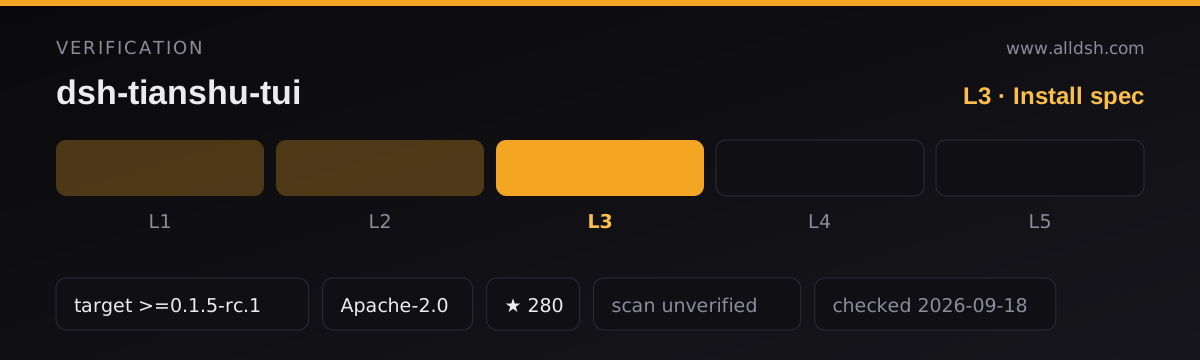
The declared harness target is >=0.1.5-rc.1. It comes from the README (“requires ≥ 0.1.5-rc.1”, with peers aligned), not from a dsh.compatibility block — the manifest has none. This listing records it as dshTarget and is therefore L3.
Requirements and install
-
Node ≥ 24.4. The README is specific about why: the 0.1.5 host CLI entry depends on
import.meta.main, and older Node silently produces no output.engines.nodedeclares^22.19 || >=24, which is looser than the README’s own warning — trust the README here. -
The official
@deepseek-ai/dshCLI at ≥0.1.5-rc.1first. This package is not a standalone program;npm ialone will not run it. -
Use pnpm, not npm 11. The README documents a reproducible
JavaScript heap out of memoryfailure installing the official CLI’s 60+ package tree with npm 11 (which ships with Node 24), and recommends pnpm. -
Do not run a stale
dshfrom PATH. A pre-0.1.0-rc.8binary on PATH sends the install down a local staging path and fails withERR_FS_EISDIR/Path is a directory …/@deepseek-ai/dsh. Usepnpm dlx @deepseek-ai/dshexplicitly. -
Install into the
tuiprofile — this is the profile the plugin targets, and the install command above preserves it:pnpm dlx @deepseek-ai/dsh plugin --profile tui add @huiliyi37/dsh-tianshu-tuiA
github:huiliyi37/dsh-tianshu-tuispec also works because the repository ships a builtlib/index.js. The README notes pnpm may report missing peers; those are host-provided and can be ignored. -
Start it with
pnpm dlx @deepseek-ai/dsh --profile tui. The welcome header showing thedsh-tianshu-tuibrand means it loaded.Ctrl+Qor/exitleaves. -
No install-time lifecycle scripts. The declared scripts are
build,lint,typecheck,testande2e:tui. -
A migration note for LSP users: if you previously installed the older community
github:omdsh-dev/dsh-lspseparately, remove it before upgrading — both register the same model-facing tool names, and mounting them together duplicates the registration.
Network and data
Update checks are the one thing that reaches out on its own. After an npm install the plugin compares itself against npm latest at each start and writes a newer version into the profile, asking you to restart. /update checks on demand and only prints the command; it does not install. Setting DSH_TUI_SKIP_UPDATE=1 disables the check. A github: or link: install is left alone rather than rewritten to an npm spec — a detail that matters if you pinned a branch deliberately.
The LSP bridge is local. Language servers start lazily by file extension when the agent touches a file, with a 2000ms per-pull timeout by default (typescript via npx is available by default; pyright, gopls, rust-analyzer, clangd and jdtls are probed on PATH). Diagnostics go into a TUI-local display cache — the README states they are not written to session events and register no model-facing surface. A slow server that misses the timeout simply yields no diagnostics, and the next file touch retries.
Everything else follows the host. The TUI does not add outbound traffic of its own beyond the update check: model calls, attachments and vision bridging go through the host’s own services.
No telemetry is documented. This listing is security: unverified; no third-party scan or independent audit is on record.
Known limits
- Two dependency sets, one of which is a fork lineage. Seventeen
@huiliyi37/dsh-*@0.6.0runtime packages ship as hard dependencies while the official DSH packages are peers at^0.1.5-rc.1. That is not a thin view layer in dependency terms, and it makes the declared host floor (>=0.1.5-rc.1) worth honouring rather than testing. - Image re-asking needs a companion package. The
ask_imagetool and the sent-image registry live in@deepseek-ai/dsh-vision-ask, a separate package in the same repository. Without it, a sent image cannot be questioned again and the same question re-invokes the vision model; the one-shot bridging path still works. - LSP diagnostics have sharp edges. A server that initialises slower than the timeout yields nothing silently;
tsserverstays resident in large repositories; switching sessions does not restart the server, sorootUristays pinned to the first session’s working directory. app.tsis still a monolith at roughly 3.2k lines. The README lists it as outstanding work; the pending-state machines have been factored out, the render composition and key arbitration have not.- Four projection models exist and only two are wired up. The README records this honestly rather than implying full coverage.
- Don’t run
tsdownin a Harness workspace root. The README warns it writes the unpublished@deepseek-ai/dsh-rootinto the bundle, which then fails to load. - Stars (277) are attention, not review. No listing here claims L4 or L5, and this one does not claim a smoke-tested install.
When to use it — and when not to
Use it if you work in a terminal and want the whole session there: a real scrolling transcript you can search and export, fork and rewind, images rendered inline, approval cards with diffs, LSP diagnostics on tool cards, and vim keymaps if you want them. The “no model-facing surface” property is the strongest argument in its favour — you get a much larger interface without changing what the model is told.
Do not install it expecting a headless renderer or a way to drive the Harness from a script: it needs a TTY and a pnpm-managed host. If you are on Node below 24.4, or unwilling to move off the npm 11 toolchain, fix that first — the failure modes the README documents are silent ones. And if you want a minimal, dependency-light view layer, this is not it; the dependency tree is part of the design.
FAQ
Is it a plugin or a fork of the Harness?
A plugin — dsh.runtime is "host", and it installs into a profile as a single tui-runner row. But it carries seventeen @huiliyi37/dsh-*@0.6.0 packages as dependencies, so it is not a zero-footprint view either. The official DSH packages it needs are peers supplied by the host.
Does the TUI change what the model sees?
No. The README states it registers no prompt, tool or context surface: user input becomes an ordinary logged message and all rendering is derived from session events. The exception is the model-facing LSP tools (lsp_goto_definition, lsp_find_references, lsp_diagnostics), which are registered by the bundled companion LSP plugin.
Why does it check npm on every start?
To tell you when a newer version exists — it writes the version into the profile and asks you to restart. /update only reports. Set DSH_TUI_SKIP_UPDATE=1 if you would rather it never call out, and note that github: and link: installs are never rewritten to an npm spec.
Why did the install fail with ERR_FS_EISDIR?
The README attributes it to an old dsh binary on PATH (below 0.1.0-rc.8) or to a stale fallback in ~/.dsh/profiles/node_modules conflicting with the official CLI. The documented workaround is to start from a clean home, e.g. DSH_HOME=/tmp/dsh-tianshu pnpm dlx @deepseek-ai/dsh ….
Can I use it alongside another TUI plugin?
Only one front end should own the terminal. It does coexist with the host’s own capabilities — memory, workflows, subagents and the rest are optional services the TUI reports as unavailable rather than swallowing silently when they are not mounted.