AllDSH
中文

DSH Visualize

Nagi-ovo · Nagi-ovo/dsh-visualize

Lets the model render interactive HTML fragments as sandboxed iframe cards inside DSH Web conversations.

DSH Visualize is a DSH plugin by Nagi-ovo. Lets the model render interactive HTML fragments as sandboxed iframe cards inside DSH Web conversations. It is filed under UI & Experience and Tools & Capabilities. Verification level L2 (Structured), an automated security scan has not run yet, and it declares no specific compatibility target; the listing was last checked on 2026-09-18 and is published under the BSD-3-Clause licence. Install it with dsh plugin --profile web add github:Nagi-ovo/dsh-visualize

Listing checked by Chiyu , data updated · How to cite

L2active
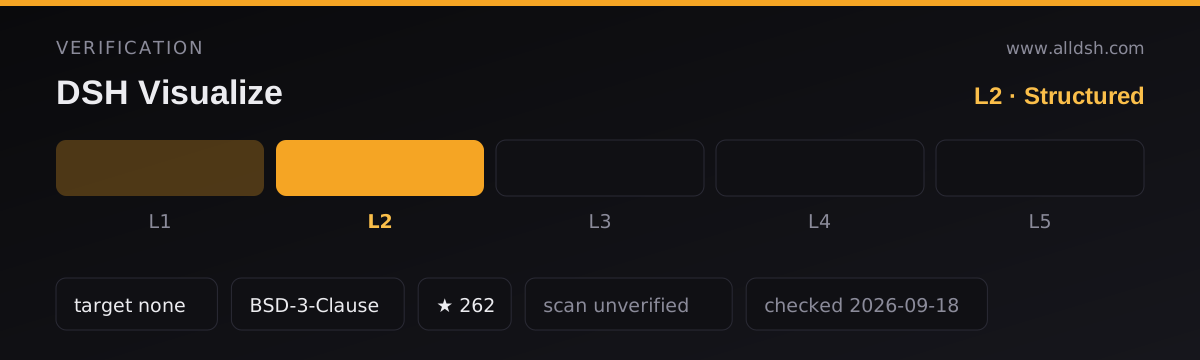
DSH Visualize verification panel: level L2 of 5 (Structured) — Manifest valid, key fields complete. Security scan: unverified — no scan has run. Compatibility target: DeepSeek Harness not declared. Licence: BSD-3-Clause. GitHub stars: 262. Listing last checked 2026-09-18.
Verification panel for DSH Visualize. The listing holds level L2 of 5 — Structured: Manifest valid, key fields complete. Security scan: unverified — no scan has run. Compatibility target: DeepSeek Harness not declared. Licence: BSD-3-Clause. Listing last checked 2026-09-18. How verification works

In use

Screenshots taken by this directory of the plugin running in a throwaway DeepSeek Harness on a generated demo project — not of your own machine, and not supplied by the author. Click any capture for the full-size version.

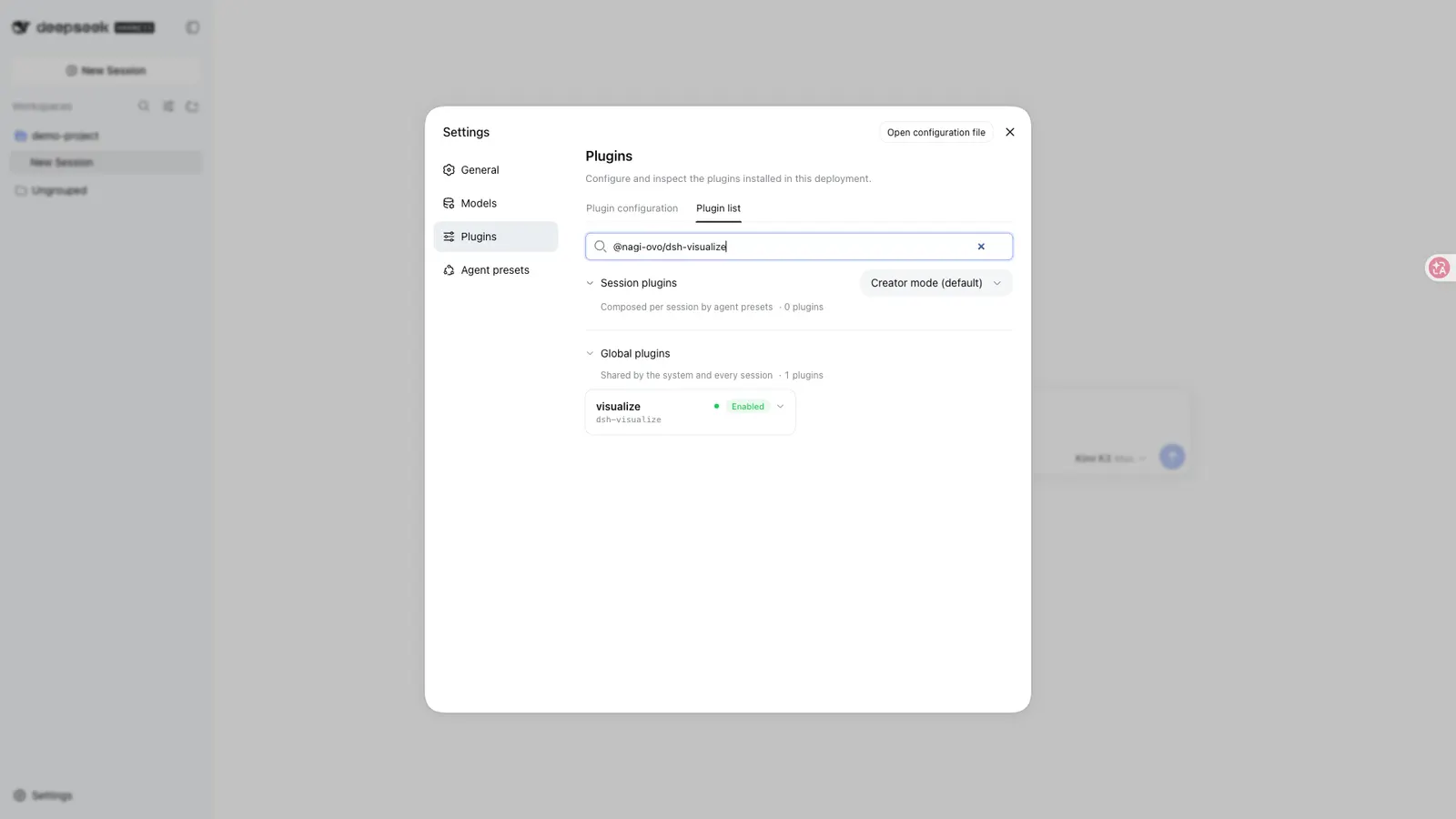
DSH Visualize — Installed and enabled, as the expanded row in Settings → Plugins → Plugin list: full package name, configuration state and runtime state.
Installed and enabled, as the expanded row in Settings → Plugins → Plugin list: full package name, configuration state and runtime state.

Captured by AllDSH on 2026-09-19 against DSH 0.1.5-rc.1 at a 1920×1080 viewport, package github:Nagi-ovo/dsh-visualize@github:Nagi-ovo/dsh-visualize.

Install command

dsh plugin --profile web add github:Nagi-ovo/dsh-visualize

Requires a running harness: start it withnpx @deepseek-ai/dsh webthen run the command above.New to this? See the installation guide.

What it does

DSH Visualize gives the model a way to answer with something other than text. It registers a visualize(path, title?, mode?) tool: the model writes an HTML fragment to a file, calls the tool with its path, and the DSH Web UI renders that fragment as an interactive card inline in the conversation — a simulator, a chart, a comparison panel or a UI mockup instead of another paragraph.

The package description names two moving parts: the tool itself, and a bundled skill that teaches the model how to author the fragments. The README is open about lineage — the idea follows the Codex desktop app’s /visualize, and the skill’s layered references and Chart.js-first route borrow from the generative-UI skill in himself65/finance-skills. An optional mode: "wide" spreads a card across more horizontal space for side-by-side content.

Cards follow the harness’s light/dark theme and whale-blue palette. On session replay they are restored from the persisted tool result, so the original fragment file does not need to still exist.

The sandbox model

This is the section to read before installing, and the README is unusually specific about it:

  • Each card renders in a sandboxed iframe with an opaque origin, cut off from the host page.
  • A Content Security Policy blocks network requests, nested pages and form submissions; the only outbound loading permitted is static assets from a fixed CDN.
  • Fragments are capped at 1,000,000 bytes by default, adjustable through a maxFragmentBytes option.

Two qualifiers keep this honest. “Fixed CDN” is still a third-party network dependency — a card that pulls in Chart.js is fetching from the internet at render time, and the README neither names the CDN nor says whether the allowlist is configurable. And the sandbox describes the rendered fragment’s containment; it says nothing about what the host-side half of the plugin can read or do. That half is undocumented — treat it as such, not as safe.

Requirements

  • Harness version: not declared. The manifest has no dsh.compatibility block and no engines field. Its peer dependencies ask for the ^0.1.0-rc.6 generation of the dsh platform packages (dsh-fs, dsh-llm, dsh-session, dsh-tools, dsh-skill, dsh-sandbox-policy), Cordis ^4.0.1, Schemastery ^3.18.1 and React ^18.2.0; its devDependencies pin 0.1.1-rc.2. Treat anything outside that generation as untested, not as compatible.
  • Web only. The client platform is declared web and injects @deepseek-ai/dsh-client-runtime. There is no TUI or headless rendering path.
  • No install-time lifecycle scripts. The package defines build, typecheck, test and check only — no preinstall/install/postinstall/prepare. The README states the build artifacts are committed to the repository, so a GitHub install needs no local build.
  • Permissions and telemetry: the README documents the iframe sandbox and nothing else — no permission model, no host-side file or network behaviour, no telemetry statement. Not documented; assume undocumented rather than safe.

Known limits

  • Cards render only in the Web UI. TUI and headless clients show the plain tool result, so the same request produces nothing visual there.
  • Cards cannot talk back. Buttons inside a card cannot send follow-up messages into the main conversation; interaction stays inside the card.
  • The byte cap is a hard ceiling on fragment size; what oversize output does beyond hitting it is not described.
  • The documented configuration surface is exactly one option (maxFragmentBytes). There is no documented way to widen the CSP, change the CDN, or restyle the cards beyond the automatic light/dark following.

When to use it — and when not to

Use it when you work in DSH Web and want the model to show you the answer — a parameter-tweakable sorting visualization, a small simulator, a comparison dashboard — rather than describe one. The tool-plus-skill pairing means you ask in plain language and the fragment authoring is the model’s problem.

Do not install it if you live in the TUI or run headless: there is nothing for the cards to render into. Do not treat the sandbox as a licence to render untrusted fragments casually — the iframe containment is documented, the host half is not, and this listing’s security status is unverified. And if what you want needs arbitrary third-party scripts, live API calls or forms, the CSP blocks all of that by design; a static charting CDN is as far as cards reach.

Install

dsh plugin --profile web add github:Nagi-ovo/dsh-visualize

GitHub install only — the package manifest is marked private and the plugin is not published to npm. Build artifacts are committed, so no local build step is needed; restart dsh web if it was running and refresh the page. The README suggests dsh --profile web --dump-config to confirm the plugin reached the final config, and notes that users of the community plugin-registry can also install it from Settings → Plugins.

Sources & references

The technical claims on this page rest on the primary documents below. Each link is followed so it can be checked directly.

  1. [1]Nagi-ovo/dsh-visualize — GitHubThe plugin’s own repository and README — the primary document every claim in this listing is checked against.
  2. [2]deepseek-ai/deepseek-harness — GitHubUpstream repository for DeepSeek Harness, the Cordis runtime and the plugin loading model.
  3. [3]@deepseek-ai/dsh on npm — npmPublished harness package, including the release tags our dshTarget field tracks.
  4. [4]dsh-plugin GitHub topic — GitHubThe discovery mechanism used to find plugins listed in this directory.

All links last verified 2026-09-11

Questions about this listing

Is DSH Visualize safe to install?
DSH Visualize holds verification level L2 of 5 — Manifest valid, key fields complete — and its security status is unverified — no scan has run. A verification level records how far the install path was exercised; it is not a safety guarantee. Safety depends on what the plugin can actually reach, so read its source and install script and check its file, shell, network and credential access before you run it.
Which DeepSeek Harness version does DSH Visualize target?
DSH Visualize declares no dshTarget, so no specific DeepSeek Harness release has been committed to. The field is optional, and its absence means this listing makes no claim about working on a particular release — test it in an isolated profile first.
How do I install DSH Visualize?
Start the harness with npx @deepseek-ai/dsh web, then copy the install command shown at the top of this page. That command is generated from the package name the repository publishes — or from an install spec the listing declares — so it cannot drift from what the repository actually ships. This listing was last checked on 2026-09-18.

Similar DSH plugins

Browse all

A multi-engine web search provider for DeepSeek Harness — free engines, Bing by default, no API key needed to start.

L3
201 TypeScript

Token-usage accounting attributed to the relay site, project and model that actually served each request, with zero configuration.

L3
201 JavaScript

dsh-image-gen

shanliuling

An image studio for DSH: chat generate and edit, a tldraw canvas, batch Studio, multi-model compare, a 500+ prompt library, a gallery and local ComfyUI — BYOK or subscription login.

L2
437 TypeScript

Spreadsheets, documents, slides, canvases and Base tables as local .univer files, edited in draft worktrees you approve or discard.

L3
362 TypeScript

dsh-cost-meter

Han-1413141

Session/daily cost, budget, multi-vendor Coding Plan quotas, peak/off-peak pricing alerts, and a bilingual settings UI for DeepSeek Harness.

L3
311 JavaScript

Text-to-image, image-to-image and a node-graph canvas in the DSH Web GUI, using the image provider channels you configure.

L2
78 TypeScript
ESC

Type to search the index. Built at deploy time by Pagefind.